<?xml version="1.0" encoding="UTF-8"?><feed
	xmlns="http://www.w3.org/2005/Atom"
	xmlns:thr="http://purl.org/syndication/thread/1.0"
	xml:lang="en-US"
	>
	<title type="text">ITBlogSec.com</title>
	<subtitle type="text">IT, network, security and hacking</subtitle>

	<updated>2025-07-25T07:38:55Z</updated>

	<link rel="alternate" type="text/html" href="https://itblogsec.com/" />
	<id>https://itblogsec.com/feed/atom/</id>
	<link rel="self" type="application/atom+xml" href="https://itblogsec.com/feed/atom/" />

	<generator uri="https://wordpress.org/" version="6.8.3">WordPress</generator>
	<entry>
		<author>
			<name>admin</name>
					</author>

		<title type="html"><![CDATA[Top Security Tips and Tricks to Protect Yourself in Today’s Digital World 2025]]></title>
		<link rel="alternate" type="text/html" href="https://itblogsec.com/top-security-tips-and-tricks-to-protect-yourself-in-todays-digital-world-2025/" />

		<id>https://itblogsec.com/?p=1360</id>
		<updated>2025-07-25T07:38:55Z</updated>
		<published>2025-07-25T07:37:50Z</published>
		<category scheme="https://itblogsec.com/" term="Hacking" /><category scheme="https://itblogsec.com/" term="News" /><category scheme="https://itblogsec.com/" term="Other" />
		<summary type="html"><![CDATA[<p>In an era where our lives are increasingly digital, safeguarding personal information and online presence&#8230;</p>
<p>The post <a href="https://itblogsec.com/top-security-tips-and-tricks-to-protect-yourself-in-todays-digital-world-2025/">Top Security Tips and Tricks to Protect Yourself in Today’s Digital World 2025</a> appeared first on <a href="https://itblogsec.com">ITBlogSec.com</a>.</p>
]]></summary>

					<content type="html" xml:base="https://itblogsec.com/top-security-tips-and-tricks-to-protect-yourself-in-todays-digital-world-2025/"><![CDATA[<p>In an era where our lives are increasingly digital, safeguarding personal information and online presence has never been more critical. Cyber threats are evolving rapidly, and hackers are becoming more sophisticated. To stay one step ahead, you need to adopt smart security practices that shield you from potential risks. Here are some essential security tips and tricks to help you stay safe in today’s interconnected world.</p>
<h3>1. Use Strong, Unique Passwords</h3>
<p>One of the simplest yet most effective security measures is creating strong, unique passwords for each of your accounts. Avoid common passwords like “password123” or “admin,” as these are easy targets for hackers. Instead, use a combination of uppercase and lowercase letters, numbers, and special characters. Consider using a password manager to generate and store complex passwords securely. This way, you won’t have to remember them all — just one master password.</p>
<h3>2. Enable Two-Factor Authentication (2FA)</h3>
<p>Adding an extra layer of security with two-factor authentication is a game-changer. With 2FA, even if hackers get hold of your password, they’ll need a second form of verification—like a code sent to your phone or fingerprint scan—to gain access. Many popular services like Gmail, Facebook, and banking apps support 2FA, so enable it wherever possible.</p>
<h3>3. Keep Software Up to Date</h3>
<p>Software developers frequently release updates to fix security vulnerabilities. Failing to install these updates leaves your devices open to attacks. Turn on automatic updates on your operating system, browsers, and apps to ensure you’re protected against the latest threats.</p>
<h3>4. Be Wary of Phishing Attacks</h3>
<p>Phishing scams are emails or messages designed to trick you into revealing sensitive information. They often appear legitimate, mimicking trusted brands or contacts. Always scrutinize emails for signs of fraud, such as suspicious sender addresses, grammatical errors, or unusual requests. Never click on suspicious links or share personal data unless you are certain of the sender’s identity.</p>
<h3>5. Secure Your Wi-Fi Network</h3>
<p>Your home Wi-Fi network is a gateway to all your connected devices. Secure it with a strong password and WPA3 encryption. Change the default router credentials and disable remote management features. Consider setting up a separate guest network for visitors to prevent access to your main devices.</p>
<h3>6. Backup Your Data Regularly</h3>
<p>Data loss can occur due to malware attacks, hardware failure, or accidental deletion. Protect yourself by regularly backing up important files to an external drive or cloud storage service. In case of an attack, having recent backups ensures you can restore your data quickly.</p>
<h3>7. Use Antivirus and Anti-Malware Software</h3>
<p>Installing reputable antivirus and anti-malware programs adds a vital layer of defense. These tools can detect and remove malicious software before it causes harm. Keep your security software updated and run regular scans.</p>
<h3>8. Limit Personal Information Sharing</h3>
<p>Be cautious about how much personal information you share online, especially on social media. Details like your address, phone number, or travel plans can be exploited by hackers for identity theft or targeted attacks. Keep your privacy settings tight and share information only with trusted contacts.</p>
<h3>9. Be Vigilant on Public Wi-Fi</h3>
<p>Public Wi-Fi networks are convenient but often insecure. Avoid accessing sensitive accounts or conducting financial transactions on public networks. If necessary, use a Virtual Private Network (VPN) to encrypt your internet connection and protect your data from prying eyes.</p>
<h3>10. Educate Yourself and Stay Informed</h3>
<p>Cyber threats evolve constantly. Stay informed about the latest scams, security tools, and best practices. Regularly educate yourself about online safety and encourage your friends and family to do the same.</p>
<p>The post <a href="https://itblogsec.com/top-security-tips-and-tricks-to-protect-yourself-in-todays-digital-world-2025/">Top Security Tips and Tricks to Protect Yourself in Today’s Digital World 2025</a> appeared first on <a href="https://itblogsec.com">ITBlogSec.com</a>.</p>
]]></content>
		
					<link rel="replies" type="text/html" href="https://itblogsec.com/top-security-tips-and-tricks-to-protect-yourself-in-todays-digital-world-2025/#comments" thr:count="0" />
			<link rel="replies" type="application/atom+xml" href="https://itblogsec.com/top-security-tips-and-tricks-to-protect-yourself-in-todays-digital-world-2025/feed/atom/" thr:count="0" />
			<thr:total>0</thr:total>
			</entry>
		<entry>
		<author>
			<name>admin</name>
					</author>

		<title type="html"><![CDATA[How to install Fail2Ban on the Raspberry Pi/Unix server]]></title>
		<link rel="alternate" type="text/html" href="https://itblogsec.com/how-to-install-fail2ban-on-the-raspberry-pi-unix-server/" />

		<id>https://itblogsec.com/?p=1335</id>
		<updated>2021-01-14T22:38:55Z</updated>
		<published>2021-01-14T22:19:36Z</published>
		<category scheme="https://itblogsec.com/" term="How to" /><category scheme="https://itblogsec.com/" term="Other" /><category scheme="https://itblogsec.com/" term="hacking" /><category scheme="https://itblogsec.com/" term="rasberry pi" />
		<summary type="html"><![CDATA[<p>By opening ports from the Internet to your raspberry pi (ssh, http, ftp, https etc.), you are automatically becoming a victim of many hacker's attempts. Hackers are seeking exploits and trying to get access to your server. To protect you against such attacks, there is a tool called Fail2Ban. It supports a lot of services (sshd, apache, qmail, proftpd etc.) and can be integrated directly with your IPTables. By this tutorial, we will guide you via the whole process of how to protect against such attacks.   </p>
<p>The post <a href="https://itblogsec.com/how-to-install-fail2ban-on-the-raspberry-pi-unix-server/">How to install Fail2Ban on the Raspberry Pi/Unix server</a> appeared first on <a href="https://itblogsec.com">ITBlogSec.com</a>.</p>
]]></summary>

					<content type="html" xml:base="https://itblogsec.com/how-to-install-fail2ban-on-the-raspberry-pi-unix-server/"><![CDATA[<h3>How to install Fail2Ban on the Raspberry Pi/Unix server</h3>
<p style="text-align: justify;">By <strong>opening ports from the Internet</strong> to your raspberry pi <strong>(ssh, http, ftp, https etc.)</strong>, you are automatically becoming a <strong>victim</strong> of many <strong>hacker&#8217;s attempts</strong>. Hackers are seeking <strong>exploits</strong> and trying <strong>to get access to your server.</strong> To protect you against such attacks, there is a <strong>tool called Fail2Ban</strong>. It supports a lot of services (sshd, apache, qmail, proftpd etc.) and can be integrated directly with your <strong>IPTables</strong>. By this tutorial, we will guide you via the whole process of how to protect against such attacks.   </p>
<h5 style="text-align: justify;">Who is trying to access my raspberry pi?</h5>
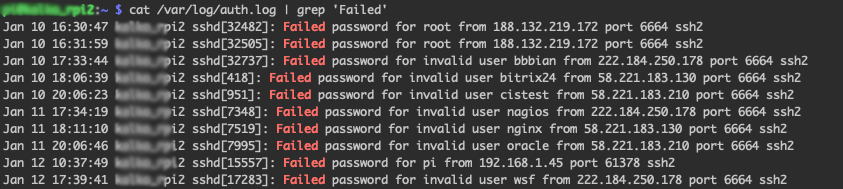
<p style="text-align: justify;">If you think that your raspberry pi is safe and you do not need any tool to be installed, please <strong>check the content</strong> of the following <strong>file</strong>:</p>
<pre class="EnlighterJSRAW" data-enlighter-language="generic" data-enlighter-theme="godzilla">cat /var/log/auth.log | grep 'Failed'</pre>
<p><a href="https://itblogsec.com/wp-content/uploads/2021/01/Pictures.png" data-rel="penci-gallery-image-content" ><img fetchpriority="high" decoding="async" class="aligncenter size-full wp-image-1346" src="https://itblogsec.com/wp-content/uploads/2021/01/Pictures.png" alt="" width="843" height="189" srcset="https://itblogsec.com/wp-content/uploads/2021/01/Pictures.png 843w, https://itblogsec.com/wp-content/uploads/2021/01/Pictures-300x67.png 300w, https://itblogsec.com/wp-content/uploads/2021/01/Pictures-768x172.png 768w, https://itblogsec.com/wp-content/uploads/2021/01/Pictures-585x131.png 585w" sizes="(max-width: 843px) 100vw, 843px" /></a></p>
<p style="text-align: justify;">As you can observe above, there are <strong>many password failures</strong>. Usually, the hacker bots are <strong>seeking exploits</strong>.  Each attempt <strong>consumes resources</strong> as your raspberry pi needs to evaluate each request. It is known as DoS attack. </p>
<p style="text-align: justify;">Hackers can try also a <b>brute-force attack. </b> Such an attack consists of an attacker submitting many passwords or passphrases with the hope of eventually <strong>guessing a combination correctly</strong>. The attacker <strong>systematically</strong> <strong>checks</strong> all <strong>possible passwords</strong> and passphrases until the correct one is found. </p>
<h5 style="text-align: justify;">What is Fail2Ban and how does it work?</h5>
<p style="text-align: justify;">Fail2Ban is a <strong>daemon</strong> that <strong>scans access log files</strong> and it bans IP addresses that <strong>show malicious signs</strong>. It <strong>protects</strong> you <strong>against</strong> <strong>too many password failures</strong> as shown above. </p>
<p style="text-align: justify;">It is a <strong>must have tool</strong> to <strong>protect</strong> your <strong>from intruders</strong> to your server or network <strong>especially</strong> if you allow <strong>outside SSH</strong> traffic or any traffics from an outside network to your Raspberry Pi. Fail2Ban tool <strong>supports many different services</strong> <strong>(sshd, apache, qmail, proftpd, sasl, asterisk, etc) </strong>and can be <strong>integrated</strong> with your <strong>IPTables</strong>.</p>
<p style="text-align: justify;"><strong>Installation</strong> of Fail2Ban is very <strong>easy</strong> to install and basic setup <strong>will drastically improve security</strong> on your Raspberry Pi. Fail2Ban works by <strong>checking your access logs for failures</strong> and depending on the settings you setup, <strong>it will ban</strong> or timeout an IP Address for a certain amount of time. Fail2Ban tool can easily protect your raspberry pi against very known brute-force and DoS attacks.</p>
<h5 style="text-align: justify;">How can I protect myself?</h5>
<p style="text-align: justify;">Very easy, by installing of Fail2Ban on your raspberry pi. We will first <strong>install Fail2Ban</strong> by typing the following commands:</p>
<pre class="EnlighterJSRAW" data-enlighter-language="generic" data-enlighter-theme="godzilla">sudo apt-get update
sudo apt-get install fail2ban</pre>
<p style="text-align: justify;">By doing that, you have Fail2Ban already installed. The <strong>configuration file</strong> is located at <strong>&#8216;/etc/fail2ban/jail.local&#8217;</strong>. If you want to change some parameters, you can simply <strong>modify this file</strong> and <strong>restart the service</strong> to take immediate effect.</p>
<p style="text-align: justify;">Let&#8217;s edit our SSH Fail2Ban configurations. Open up the &#8216;/etc/fail2ban/jail.local&#8217; file with the following command:</p>
<pre class="EnlighterJSRAW" data-enlighter-language="generic" data-enlighter-theme="godzilla">sudo nano /etc/fail2ban/jail.local</pre>
<p style="text-align: justify;">Your <strong>jail.local file should already contain</strong> some <strong>pre-defined config.</strong> We will need to tweak it a little bit. Find a section in the file called <strong>[sshd]</strong> and paste/modify accordingly:</p>
<div id="crayon-5fdbb26ace0f1756477449-1" class="crayon-line">
<pre class="EnlighterJSRAW" data-enlighter-language="generic" data-enlighter-theme="godzilla">[sshd]

enabled = true
filter = sshd
port = ssh
logpath = /var/log/auth.log
bantime = 86400
banaction = iptables-allports
findtime = 900
maxretry = 3
backend = %(sshd_backend)s</pre>
<p style="text-align: justify;">After pasting the settings hit CTRL+X and then Y to save the configuration file. Below is what each line in the configuration means and what you can edit:</p>
<p style="text-align: justify;"><strong><em>enabled</em></strong>: Determines whether or not the filter is turned on.</p>
<p style="text-align: justify;"><em><strong>filter</strong></em>: The name of the file located in ‘/etc/fail2ban/filter.d’ that contains the failregex information used to parse log files appropriately.</p>
<p style="text-align: justify;"><em><strong>port</strong></em>: The port Fail2Ban should be referencing in regards to the service. If using the default port, then the service name can be placed here. If you changed your SSH port to something else you would need to write the new port number here.</p>
<p style="text-align: justify;"><em><strong>logpath</strong></em>: The path to your log file.</p>
<p style="text-align: justify;"><em><strong>bantime</strong></em>: The length of time in seconds that the IP Address will be banned for. In my example I used ‘86400’ seconds which would be 24 hours. If you want to ban an IP Address permanently then you will set the <em><strong>bantime</strong></em> to ‘-1’.</p>
<p style="text-align: justify;"><em><strong>banaction</strong></em>: The action to take when banning an IP Address.</p>
<p style="text-align: justify;"><em><strong>findtime</strong></em>: The length of time between login attempts before a ban is set. For example, if Fail2Ban is set to ban an IP after three failed log-in attempts, those three attempts must occur within the set <em><strong>findtime</strong></em> limit. The <em><strong>findtime</strong></em> value should be a set number of seconds.</p>
<p style="text-align: justify;"><em><strong>maxretry</strong></em>: How many attempts can be made to access the server from a single IP before a ban is imposed.</p>
<p style="text-align: justify;">After modification of the configuration file, you need to restart the service to take changes affect:</p>
<pre class="EnlighterJSRAW" data-enlighter-language="generic" data-enlighter-theme="godzilla">sudo service fail2ban restart</pre>
<p style="text-align: justify;">After the restart of service, <strong>your raspberry pi is already protected</strong> and all <strong>DoS</strong> or <strong>brute-force attempts</strong> will be <strong>banned</strong>. The list of all <strong>banned IPs</strong> is <strong>cleared</strong> upon<strong> restarting Fail2Ban</strong> or <strong>rebooting</strong> the <strong>server</strong>. If you manage to ban yourself, you can simply reboot the server or use the command below:</p>
<pre class="EnlighterJSRAW" data-enlighter-language="generic" data-enlighter-theme="godzilla">sudo fail2ban-client set sshd unbanip &lt;IP-YOU-WANT-TO-UNBAN&gt;</pre>
<p style="text-align: justify;">You can <strong>check</strong> your <strong>IPTables</strong> <strong>list</strong> with the following command to see <strong>all your banned IP</strong> addresses:</p>
</div>
<pre class="EnlighterJSRAW" data-enlighter-language="generic" data-enlighter-theme="godzilla">sudo iptables -L -n --line</pre>
<p><span style="font-size: 8pt;"><strong>source:</strong> <a href="https://en.wikipedia.org/wiki/Brute-force_attack" target="_blank" rel="noopener">https://en.wikipedia.org/wiki/Brute-force_attack</a>, <a href="https://www.fail2ban.org/wiki/index.php/Main_Page" target="_blank" rel="noopener">https://www.fail2ban.org/wiki/index.php/Main_Page</a></span></p>
</div>
<p>The post <a href="https://itblogsec.com/how-to-install-fail2ban-on-the-raspberry-pi-unix-server/">How to install Fail2Ban on the Raspberry Pi/Unix server</a> appeared first on <a href="https://itblogsec.com">ITBlogSec.com</a>.</p>
]]></content>
		
					<link rel="replies" type="text/html" href="https://itblogsec.com/how-to-install-fail2ban-on-the-raspberry-pi-unix-server/#comments" thr:count="0" />
			<link rel="replies" type="application/atom+xml" href="https://itblogsec.com/how-to-install-fail2ban-on-the-raspberry-pi-unix-server/feed/atom/" thr:count="0" />
			<thr:total>0</thr:total>
			</entry>
		<entry>
		<author>
			<name>admin</name>
					</author>

		<title type="html"><![CDATA[Bitcoin’s journey through the Covid-19 pandemic]]></title>
		<link rel="alternate" type="text/html" href="https://itblogsec.com/bitcoins-journey-through-the-covid-19-pandemic/" />

		<id>https://itblogsec.com/?p=1322</id>
		<updated>2020-05-28T14:08:44Z</updated>
		<published>2020-05-28T13:46:57Z</published>
		<category scheme="https://itblogsec.com/" term="News" /><category scheme="https://itblogsec.com/" term="bitcoin" />
		<summary type="html"><![CDATA[<p>For those of you who are considered experts in the Bitcoin community and everyone following Bitcoin’s price fluctuations for the sake of your own coin’s future, you probably already know at least some of the information pictured below. To get a better grasp of what was going on with Bitcoin during the pandemic and where Bitcoin is now, see the following infographic: Bitcoin vs. Covid-19 – Bitcoin’s journey through the Covid-19 pandemic.</p>
<p>The post <a href="https://itblogsec.com/bitcoins-journey-through-the-covid-19-pandemic/">Bitcoin’s journey through the Covid-19 pandemic</a> appeared first on <a href="https://itblogsec.com">ITBlogSec.com</a>.</p>
]]></summary>

					<content type="html" xml:base="https://itblogsec.com/bitcoins-journey-through-the-covid-19-pandemic/"><![CDATA[<p style="text-align: justify;">Do you own <a href="https://itblogsec.com/67-insane-facts-about-bitcoin-infographic/" target="_blank" rel="noopener noreferrer"><strong>Bitcoin</strong></a>? Do you buy with it, <strong>trade</strong> it, perhaps <a href="https://gamblineers.com" target="_blank" rel="noopener noreferrer"><strong>gamble</strong></a> with it?</p>
<p style="text-align: justify;">The oldest, biggest, sturdiest <strong>cryptocurrency still rules over the crypto world</strong> however even the digital giant felt something when the <strong>Covid-19 pandemic began in March 2020</strong>. Charts swayed and some of the biggest Bitcoin enthusiasts were filled with doubt but don&#8217;t fear, Bitcoin is well.</p>
<p style="text-align: justify;">For those of you who are considered experts in the Bitcoin community and everyone <strong>following <a href="https://itblogsec.com/who-accepts-bitcoin-infographic/" target="_blank" rel="noopener noreferrer">Bitcoin’s price fluctuations</a></strong> for the sake of <strong>your own coin’s future</strong>, you probably already know at least some of the information pictured below. To get a <strong>better grasp of what was going on</strong> with Bitcoin during the pandemic and where Bitcoin is now, see the following infographic: <strong>Bitcoin vs. Covid-19</strong> –<strong> Bitcoin’s journey through the Covid-19 pandemic.</strong></p>
<div id="attachment_1327" style="width: 522px" class="wp-caption aligncenter"><a href="https://itblogsec.com/wp-content/uploads/2020/05/Bitcoin-vs-Covid-19-infographic-scaled.jpg" data-rel="penci-gallery-image-content" ><img decoding="async" aria-describedby="caption-attachment-1327" class="wp-image-1327 size-full" src="https://itblogsec.com/wp-content/uploads/2020/05/Bitcoin-vs-Covid-19-infographic-scaled.jpg" alt="Bitcoin vs Covid 19" width="512" height="2560" srcset="https://itblogsec.com/wp-content/uploads/2020/05/Bitcoin-vs-Covid-19-infographic-scaled.jpg 512w, https://itblogsec.com/wp-content/uploads/2020/05/Bitcoin-vs-Covid-19-infographic-60x300.jpg 60w, https://itblogsec.com/wp-content/uploads/2020/05/Bitcoin-vs-Covid-19-infographic-205x1024.jpg 205w, https://itblogsec.com/wp-content/uploads/2020/05/Bitcoin-vs-Covid-19-infographic-768x3840.jpg 768w, https://itblogsec.com/wp-content/uploads/2020/05/Bitcoin-vs-Covid-19-infographic-307x1536.jpg 307w, https://itblogsec.com/wp-content/uploads/2020/05/Bitcoin-vs-Covid-19-infographic-585x2925.jpg 585w" sizes="(max-width: 512px) 100vw, 512px" /></a><p id="caption-attachment-1327" class="wp-caption-text">Bitcoin vs Covid 19</p></div>
<p>The post <a href="https://itblogsec.com/bitcoins-journey-through-the-covid-19-pandemic/">Bitcoin’s journey through the Covid-19 pandemic</a> appeared first on <a href="https://itblogsec.com">ITBlogSec.com</a>.</p>
]]></content>
		
					<link rel="replies" type="text/html" href="https://itblogsec.com/bitcoins-journey-through-the-covid-19-pandemic/#comments" thr:count="0" />
			<link rel="replies" type="application/atom+xml" href="https://itblogsec.com/bitcoins-journey-through-the-covid-19-pandemic/feed/atom/" thr:count="0" />
			<thr:total>0</thr:total>
			</entry>
		<entry>
		<author>
			<name>admin</name>
					</author>

		<title type="html"><![CDATA[Hacking for beginners #1 &#8211; Install the Kali Linux]]></title>
		<link rel="alternate" type="text/html" href="https://itblogsec.com/hacking-for-beginners-1-install-the-kali-linux/" />

		<id>https://itblogsec.com/?p=1240</id>
		<updated>2020-05-05T13:47:38Z</updated>
		<published>2020-05-05T08:33:06Z</published>
		<category scheme="https://itblogsec.com/" term="Hacking" /><category scheme="https://itblogsec.com/" term="How to" /><category scheme="https://itblogsec.com/" term="hacking" /><category scheme="https://itblogsec.com/" term="kali linux" />
		<summary type="html"><![CDATA[<p>In this tutorial series called Hacking for beginners, we are going to teach you how to use the most powerful open-source Linux system called Kali Linux. This tutorial gives a complete understanding of Kali Linux and explains how to use it in practice for various hacker activities. We are focusing on step-by-step guidelines with the best explanation so even beginners and hacking dummies can understand  and follow it.</p>
<p>The post <a href="https://itblogsec.com/hacking-for-beginners-1-install-the-kali-linux/">Hacking for beginners #1 &#8211; Install the Kali Linux</a> appeared first on <a href="https://itblogsec.com">ITBlogSec.com</a>.</p>
]]></summary>

					<content type="html" xml:base="https://itblogsec.com/hacking-for-beginners-1-install-the-kali-linux/"><![CDATA[<p style="text-align: justify;">In this tutorial series called <strong>Hacking for beginners</strong>, we are going to teach you how to use the most <strong>powerful open-source Linux system</strong> called <strong><a href="https://www.kali.org" target="_blank" rel="noopener noreferrer">Kali Linux</a>. </strong>This tutorial gives a <strong>complete</strong> <strong>understanding</strong> of <strong>Kali Linux</strong> and explains how to use it <strong>in practice for various hacker activities</strong>. We are focusing on step-by-step guidelines with the best explanation so even beginners and hacking dummies can understand  and follow it. Be polite, be ethical and use it only for education purposes! <strong>Enjoy and stay tuned for the next episodes <img src="https://s.w.org/images/core/emoji/16.0.1/72x72/1f609.png" alt="😉" class="wp-smiley" style="height: 1em; max-height: 1em;" /> </strong></p>
<h3 style="text-align: justify;">What you can learn </h3>
<p style="text-align: justify;">If you want to start with hacking, first you need <strong>to have some hacking tools available</strong>. The best option for that purpose is using Kali Linux what is linux distribution specially designed to be used for hacking activities. As the part of our hacking tutorials for beginners, we are starting with the <strong>#1</strong> where you can find exact steps <strong>how to install Kali linux on MacOS using Parallels Desktop or Virtual Box</strong>. Of course, you can use <strong>any virtualization platform</strong> you want, even there is ARM Kali Linux image available for <a href="https://itblogsec.com/build-own-openvpn-server-by-using-raspberry-pi-12/" target="_blank" rel="noopener noreferrer"><strong>rapsbperry PI</strong></a>, you can download it <a href="https://www.offensive-security.com/kali-linux-arm-images/" target="_blank" rel="noopener noreferrer">here</a>. </p>
<h3 style="text-align: justify;"><strong>1: Download kali linux image</strong></h3>
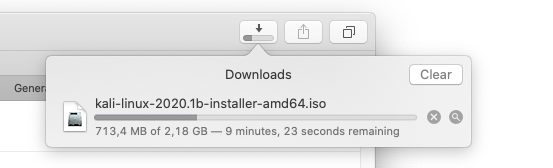
<p><strong>&#8211; use official webpage https://www.kali.org/downloads/</strong></p>
<p><a href="https://itblogsec.com/wp-content/uploads/2020/05/Screenshot-2020-04-29-at-13.42.16.png" data-rel="penci-gallery-image-content" ><img decoding="async" class="aligncenter size-full wp-image-1242" src="https://itblogsec.com/wp-content/uploads/2020/05/Screenshot-2020-04-29-at-13.42.16.png" alt="" width="553" height="168" srcset="https://itblogsec.com/wp-content/uploads/2020/05/Screenshot-2020-04-29-at-13.42.16.png 553w, https://itblogsec.com/wp-content/uploads/2020/05/Screenshot-2020-04-29-at-13.42.16-300x91.png 300w" sizes="(max-width: 553px) 100vw, 553px" /></a></p>
<p>&nbsp;</p>
<h3><strong>2: Import Kali linux image </strong></h3>
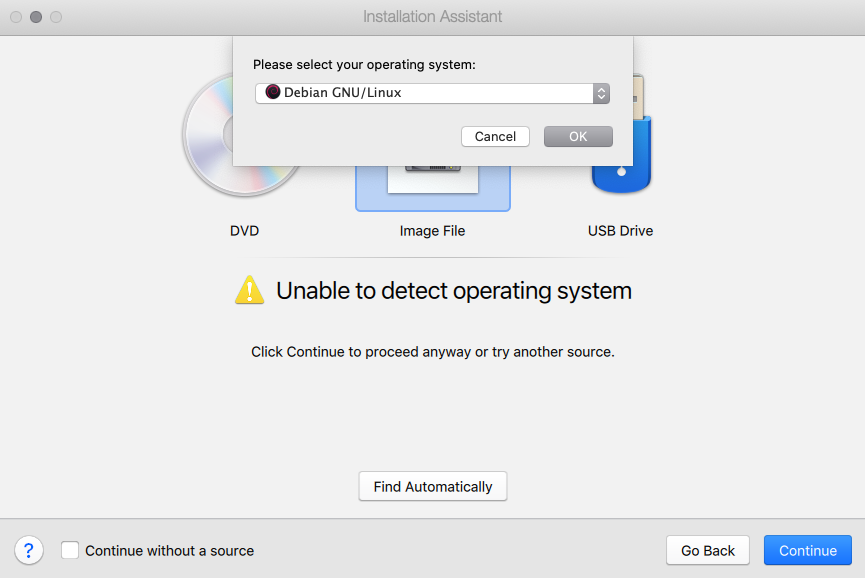
<p><strong>&#8211; here is example by using Parallels Desktop &#8211; choose Debian GNI/Linux (the same applicable for for Virtual Box)</strong></p>
<p><a href="https://itblogsec.com/wp-content/uploads/2020/05/Screenshot-2020-04-29-at-16.00.46.png" data-rel="penci-gallery-image-content" ><img loading="lazy" decoding="async" class="aligncenter size-full wp-image-1248" src="https://itblogsec.com/wp-content/uploads/2020/05/Screenshot-2020-04-29-at-16.00.46.png" alt="" width="865" height="578" srcset="https://itblogsec.com/wp-content/uploads/2020/05/Screenshot-2020-04-29-at-16.00.46.png 865w, https://itblogsec.com/wp-content/uploads/2020/05/Screenshot-2020-04-29-at-16.00.46-300x200.png 300w, https://itblogsec.com/wp-content/uploads/2020/05/Screenshot-2020-04-29-at-16.00.46-768x513.png 768w" sizes="(max-width: 865px) 100vw, 865px" /></a></p>
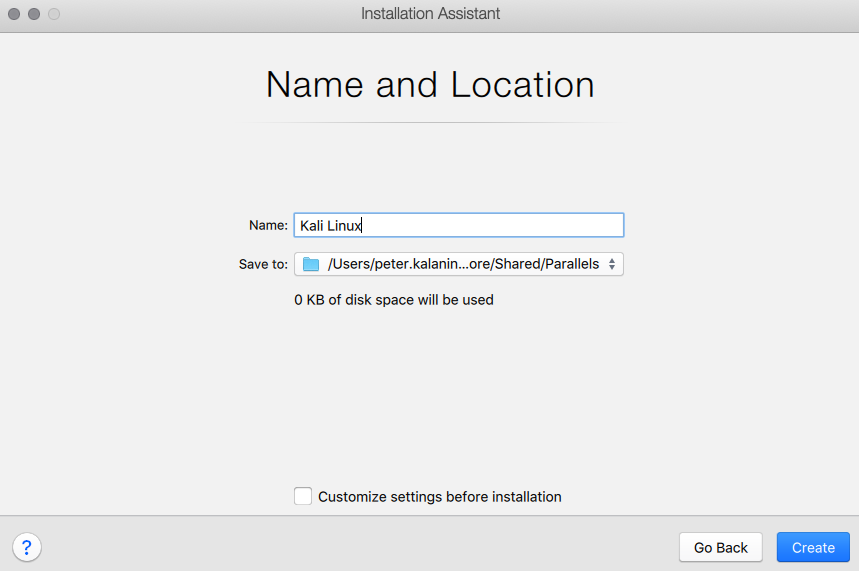
<h3><strong>3: Choose name and location </strong></h3>
<p><a href="https://itblogsec.com/wp-content/uploads/2020/05/Screenshot-2020-04-29-at-16.01.08.png" data-rel="penci-gallery-image-content" ><img loading="lazy" decoding="async" class="aligncenter size-full wp-image-1251" src="https://itblogsec.com/wp-content/uploads/2020/05/Screenshot-2020-04-29-at-16.01.08.png" alt="" width="859" height="571" srcset="https://itblogsec.com/wp-content/uploads/2020/05/Screenshot-2020-04-29-at-16.01.08.png 859w, https://itblogsec.com/wp-content/uploads/2020/05/Screenshot-2020-04-29-at-16.01.08-300x199.png 300w, https://itblogsec.com/wp-content/uploads/2020/05/Screenshot-2020-04-29-at-16.01.08-768x511.png 768w" sizes="(max-width: 859px) 100vw, 859px" /></a></p>
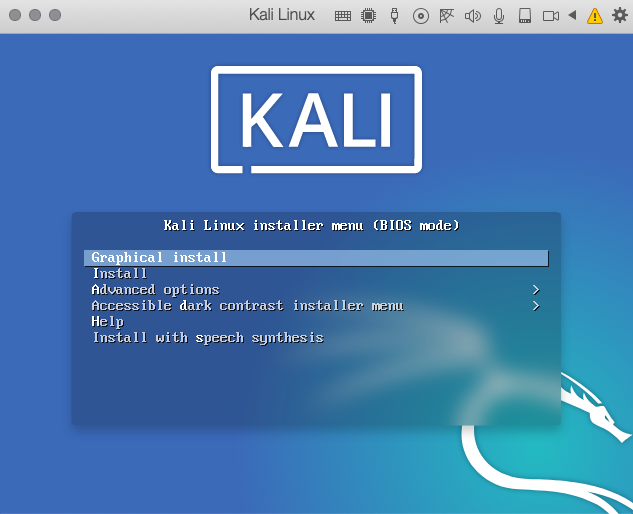
<h3><strong>4: Select type of installation (Graphical install)</strong></h3>
<p><a href="https://itblogsec.com/wp-content/uploads/2020/05/Screenshot-2020-04-29-at-16.03.19.png" data-rel="penci-gallery-image-content" ><img loading="lazy" decoding="async" class="aligncenter size-full wp-image-1252" src="https://itblogsec.com/wp-content/uploads/2020/05/Screenshot-2020-04-29-at-16.03.19.png" alt="" width="633" height="514" srcset="https://itblogsec.com/wp-content/uploads/2020/05/Screenshot-2020-04-29-at-16.03.19.png 633w, https://itblogsec.com/wp-content/uploads/2020/05/Screenshot-2020-04-29-at-16.03.19-300x244.png 300w" sizes="(max-width: 633px) 100vw, 633px" /></a></p>
<p>&nbsp;</p>
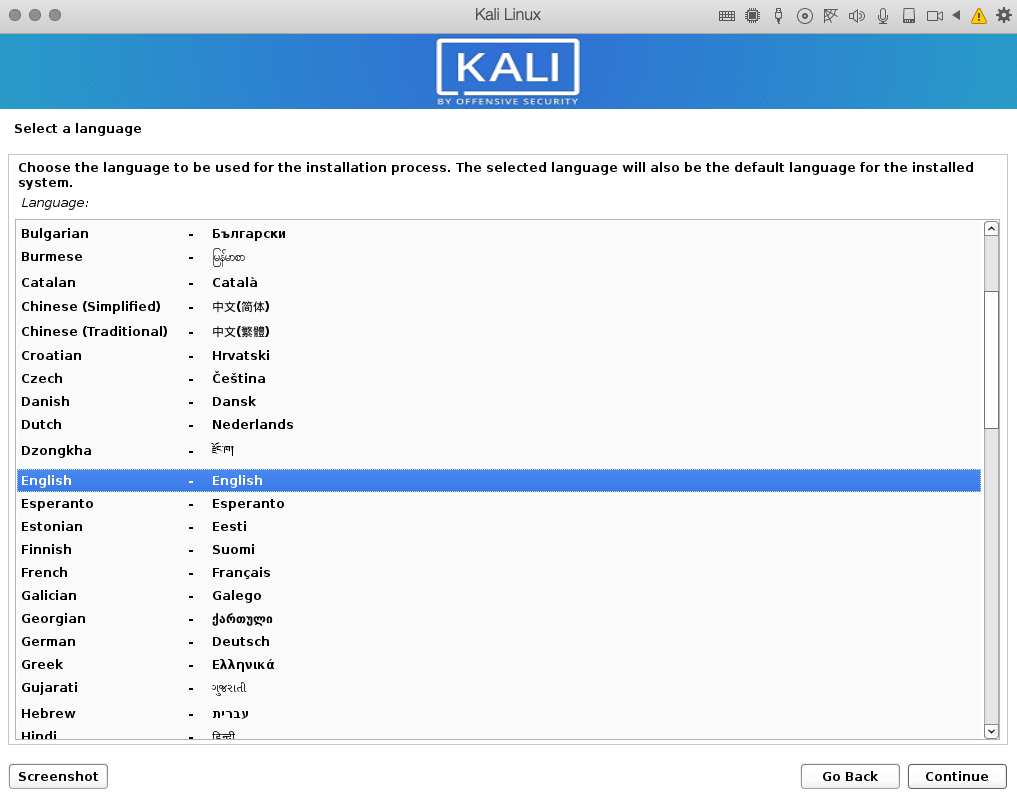
<h3><strong>5: Select language for installation</strong></h3>
<p><a href="https://itblogsec.com/wp-content/uploads/2020/05/Screenshot-2020-04-29-at-16.03.53.png" data-rel="penci-gallery-image-content" ><img loading="lazy" decoding="async" class="aligncenter size-full wp-image-1253" src="https://itblogsec.com/wp-content/uploads/2020/05/Screenshot-2020-04-29-at-16.03.53.png" alt="" width="1017" height="797" srcset="https://itblogsec.com/wp-content/uploads/2020/05/Screenshot-2020-04-29-at-16.03.53.png 1017w, https://itblogsec.com/wp-content/uploads/2020/05/Screenshot-2020-04-29-at-16.03.53-300x235.png 300w, https://itblogsec.com/wp-content/uploads/2020/05/Screenshot-2020-04-29-at-16.03.53-768x602.png 768w" sizes="(max-width: 1017px) 100vw, 1017px" /></a></p>
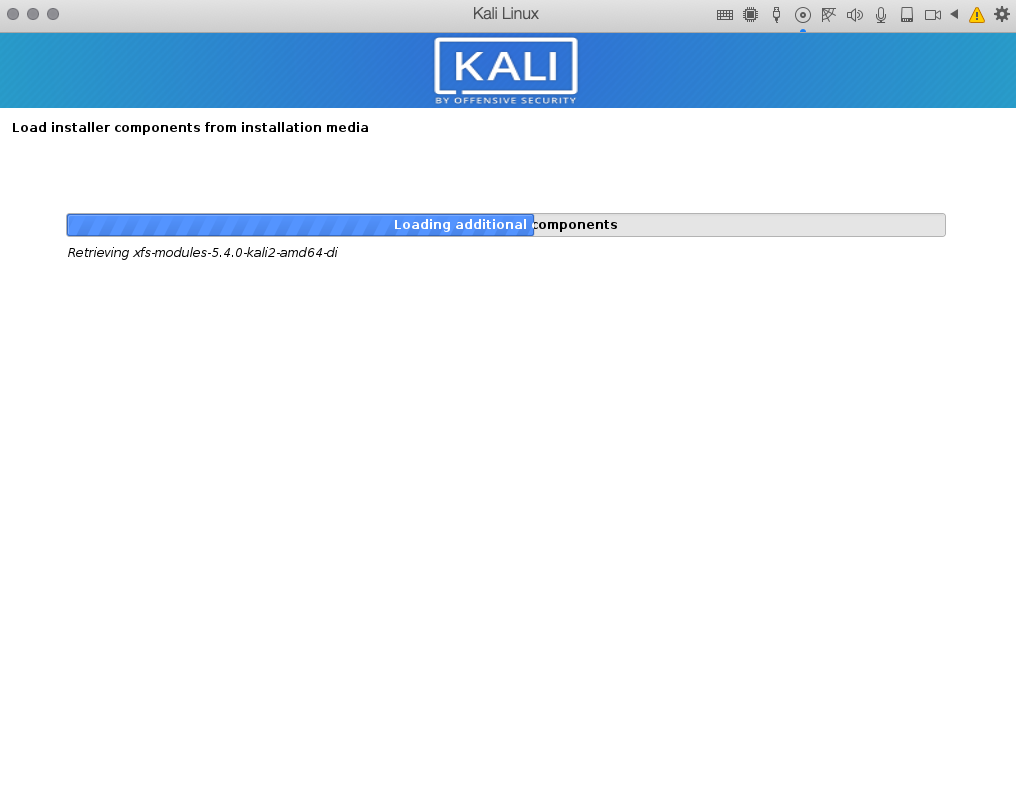
<h3><strong>6: Wait for installation </strong></h3>
<p><a href="https://itblogsec.com/wp-content/uploads/2020/05/Screenshot-2020-04-29-at-16.04.23.png" data-rel="penci-gallery-image-content" ><img loading="lazy" decoding="async" class="aligncenter wp-image-1255 size-full" src="https://itblogsec.com/wp-content/uploads/2020/05/Screenshot-2020-04-29-at-16.04.23-e1588674488352.png" alt="" width="1016" height="314" srcset="https://itblogsec.com/wp-content/uploads/2020/05/Screenshot-2020-04-29-at-16.04.23-e1588674488352.png 1016w, https://itblogsec.com/wp-content/uploads/2020/05/Screenshot-2020-04-29-at-16.04.23-e1588674488352-300x93.png 300w, https://itblogsec.com/wp-content/uploads/2020/05/Screenshot-2020-04-29-at-16.04.23-e1588674488352-768x237.png 768w" sizes="(max-width: 1016px) 100vw, 1016px" /></a></p>
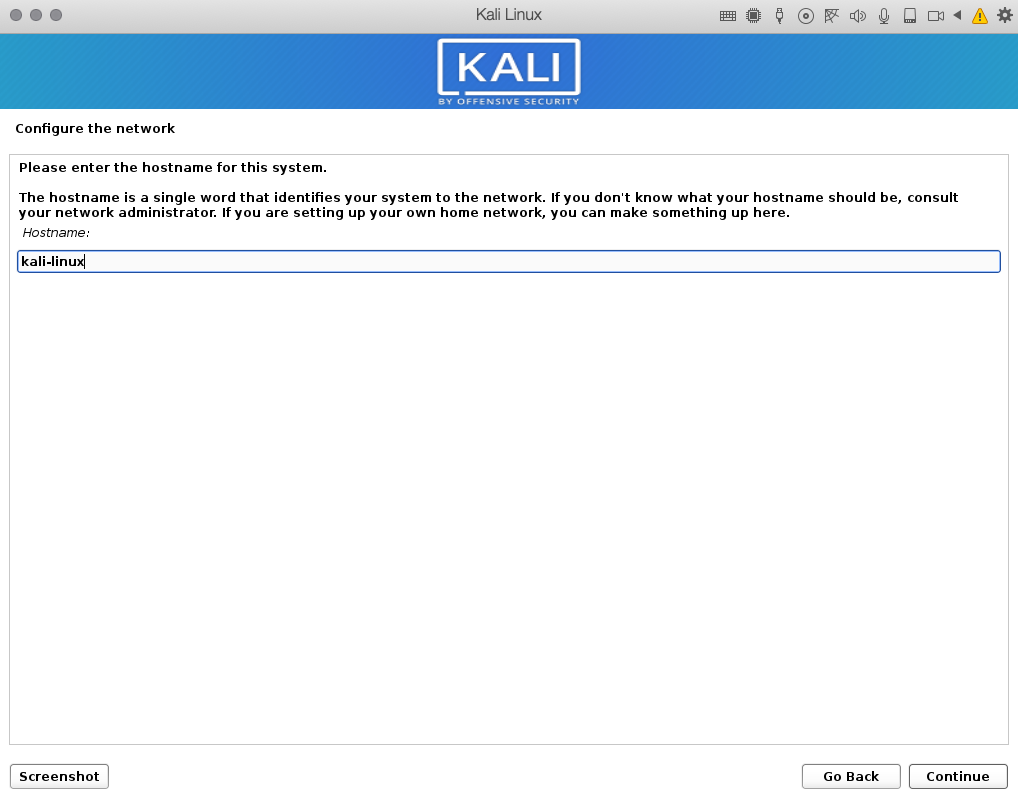
<h3><strong>7: Type hostname of your Kali linux system</strong></h3>
<p><a href="https://itblogsec.com/wp-content/uploads/2020/05/Screenshot-2020-04-29-at-16.05.17.png" data-rel="penci-gallery-image-content" ><img loading="lazy" decoding="async" class="aligncenter size-full wp-image-1256" src="https://itblogsec.com/wp-content/uploads/2020/05/Screenshot-2020-04-29-at-16.05.17.png" alt="" width="1018" height="798" srcset="https://itblogsec.com/wp-content/uploads/2020/05/Screenshot-2020-04-29-at-16.05.17.png 1018w, https://itblogsec.com/wp-content/uploads/2020/05/Screenshot-2020-04-29-at-16.05.17-300x235.png 300w, https://itblogsec.com/wp-content/uploads/2020/05/Screenshot-2020-04-29-at-16.05.17-768x602.png 768w" sizes="(max-width: 1018px) 100vw, 1018px" /></a></p>
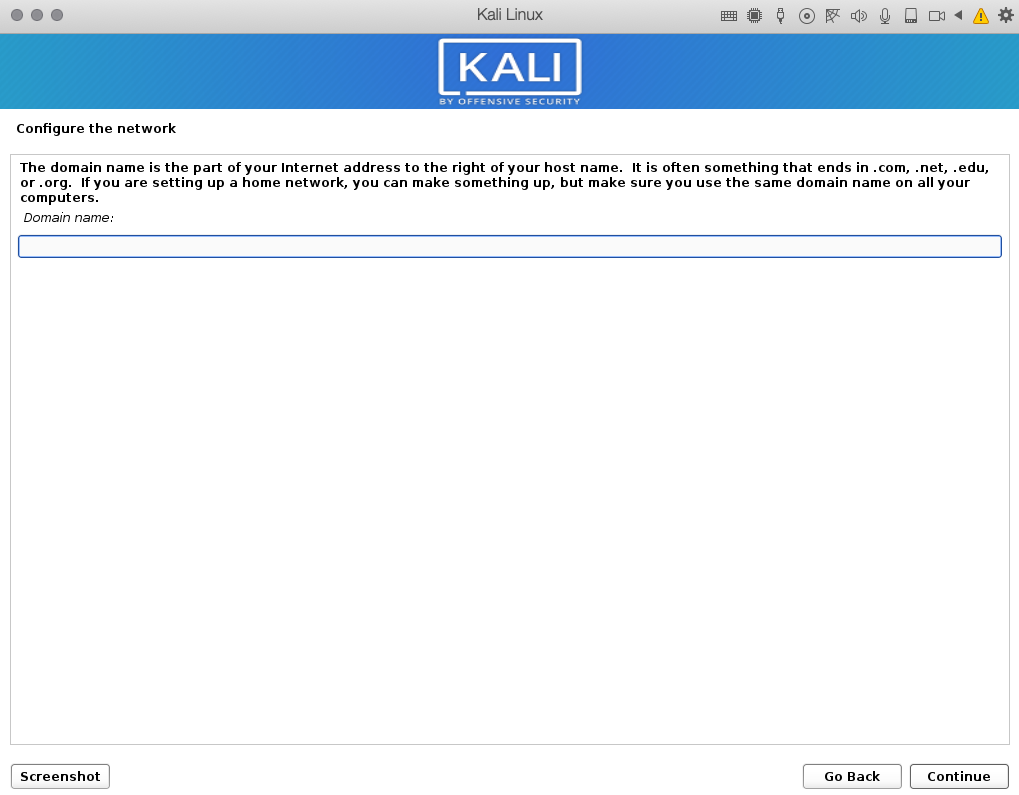
<h3><strong>8: Type domain name</strong></h3>
<p><strong>&#8211; if you do not use domain, just leave it blank</strong></p>
<p><a href="https://itblogsec.com/wp-content/uploads/2020/05/Screenshot-2020-04-29-at-16.05.30.png" data-rel="penci-gallery-image-content" ><img loading="lazy" decoding="async" class="aligncenter size-full wp-image-1257" src="https://itblogsec.com/wp-content/uploads/2020/05/Screenshot-2020-04-29-at-16.05.30.png" alt="" width="1019" height="795" srcset="https://itblogsec.com/wp-content/uploads/2020/05/Screenshot-2020-04-29-at-16.05.30.png 1019w, https://itblogsec.com/wp-content/uploads/2020/05/Screenshot-2020-04-29-at-16.05.30-300x234.png 300w, https://itblogsec.com/wp-content/uploads/2020/05/Screenshot-2020-04-29-at-16.05.30-768x599.png 768w" sizes="(max-width: 1019px) 100vw, 1019px" /></a></p>
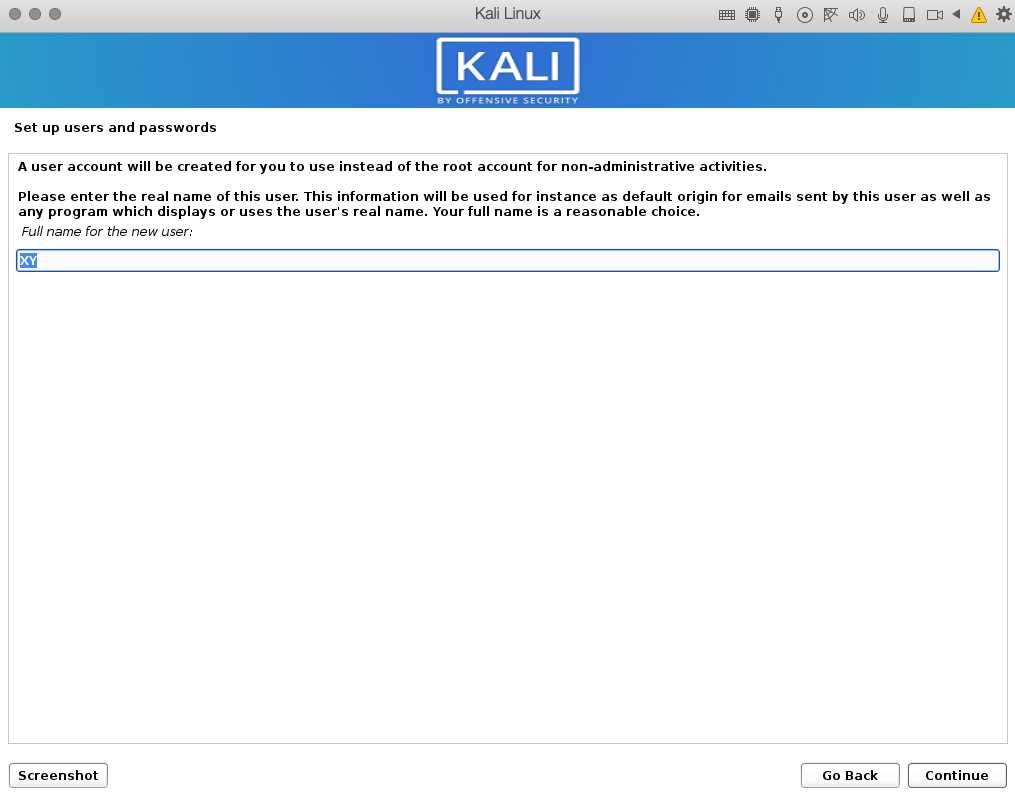
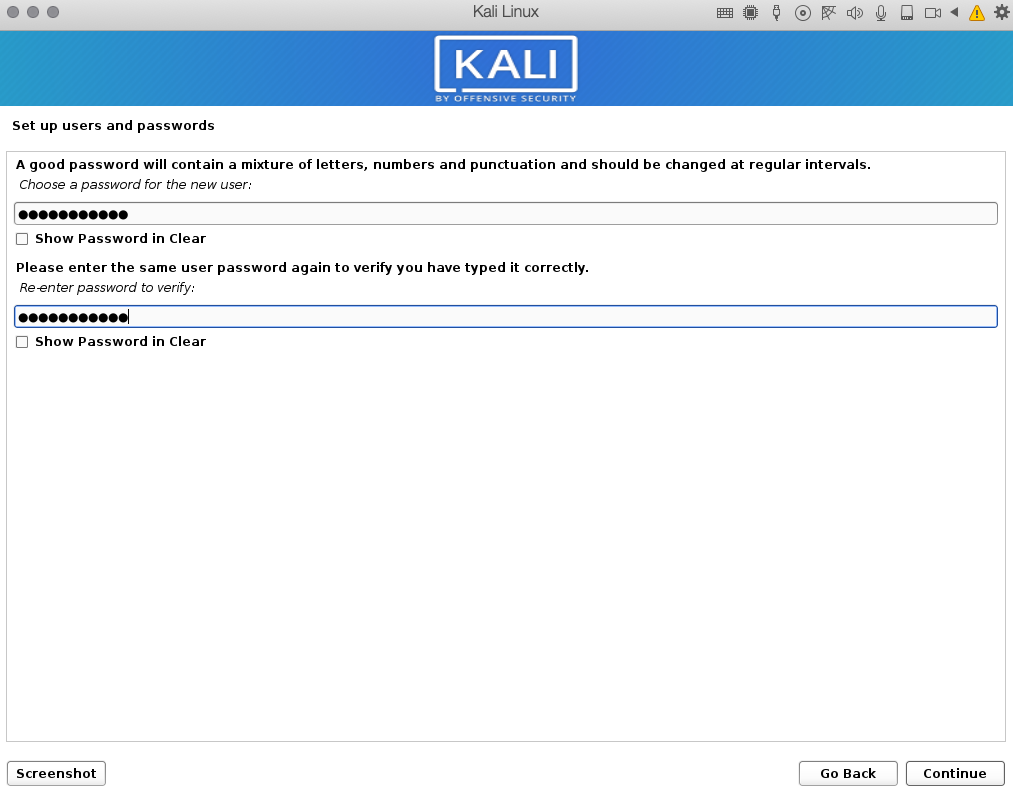
<h3><strong>9: Set-up user and password </strong></h3>
<p><strong>&#8211; (always use strong password)</strong></p>
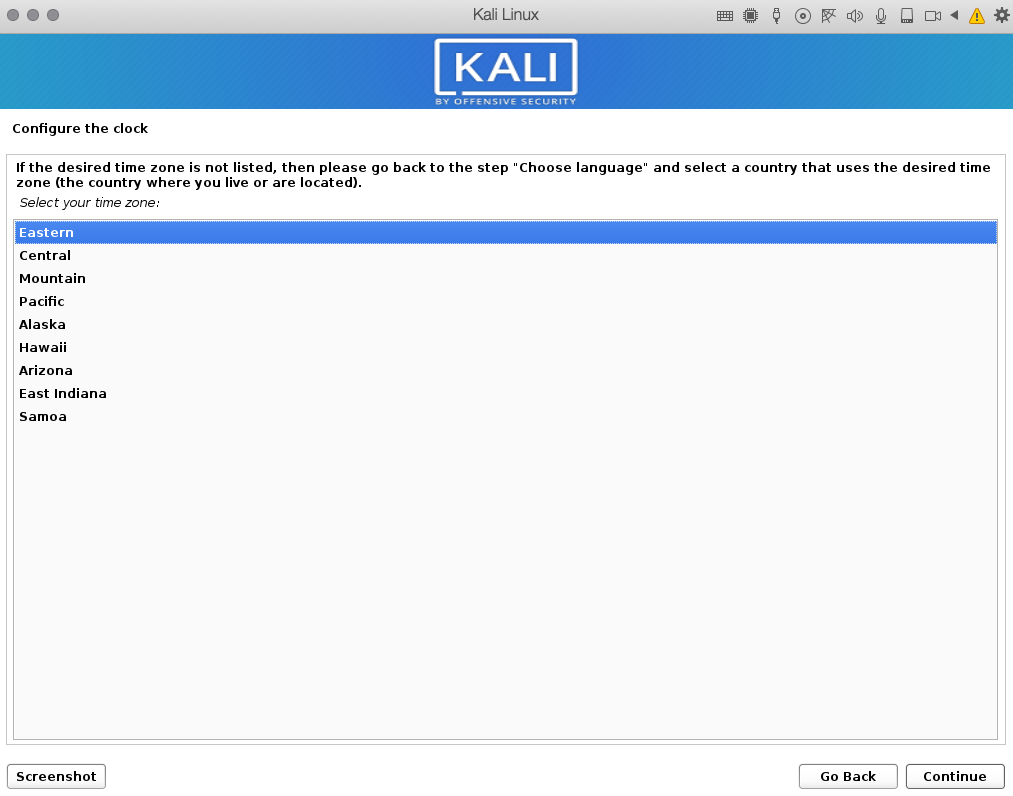
<h3><a href="https://itblogsec.com/wp-content/uploads/2020/05/Screenshot-2020-04-29-at-16.05.51.png" data-rel="penci-gallery-image-content" ><img loading="lazy" decoding="async" class="aligncenter size-full wp-image-1258" src="https://itblogsec.com/wp-content/uploads/2020/05/Screenshot-2020-04-29-at-16.05.51.png" alt="" width="1014" height="798" srcset="https://itblogsec.com/wp-content/uploads/2020/05/Screenshot-2020-04-29-at-16.05.51.png 1014w, https://itblogsec.com/wp-content/uploads/2020/05/Screenshot-2020-04-29-at-16.05.51-300x236.png 300w, https://itblogsec.com/wp-content/uploads/2020/05/Screenshot-2020-04-29-at-16.05.51-768x604.png 768w" sizes="(max-width: 1014px) 100vw, 1014px" /></a> <a href="https://itblogsec.com/wp-content/uploads/2020/05/Screenshot-2020-04-29-at-16.06.27.png" data-rel="penci-gallery-image-content" ><img loading="lazy" decoding="async" class="aligncenter size-large wp-image-1259" src="https://itblogsec.com/wp-content/uploads/2020/05/Screenshot-2020-04-29-at-16.06.27.png" alt="" width="1015" height="792" srcset="https://itblogsec.com/wp-content/uploads/2020/05/Screenshot-2020-04-29-at-16.06.27.png 1015w, https://itblogsec.com/wp-content/uploads/2020/05/Screenshot-2020-04-29-at-16.06.27-300x234.png 300w, https://itblogsec.com/wp-content/uploads/2020/05/Screenshot-2020-04-29-at-16.06.27-768x599.png 768w" sizes="(max-width: 1015px) 100vw, 1015px" /></a> <a href="https://itblogsec.com/wp-content/uploads/2020/05/Screenshot-2020-04-29-at-16.06.58.png" data-rel="penci-gallery-image-content" ><img loading="lazy" decoding="async" class="aligncenter size-large wp-image-1260" src="https://itblogsec.com/wp-content/uploads/2020/05/Screenshot-2020-04-29-at-16.06.58.png" alt="" width="1013" height="796" srcset="https://itblogsec.com/wp-content/uploads/2020/05/Screenshot-2020-04-29-at-16.06.58.png 1013w, https://itblogsec.com/wp-content/uploads/2020/05/Screenshot-2020-04-29-at-16.06.58-300x236.png 300w, https://itblogsec.com/wp-content/uploads/2020/05/Screenshot-2020-04-29-at-16.06.58-768x603.png 768w" sizes="(max-width: 1013px) 100vw, 1013px" /></a><strong>10: Select your time-zone</strong> </h3>
<p><a href="https://itblogsec.com/wp-content/uploads/2020/05/Screenshot-2020-04-29-at-16.07.15.png" data-rel="penci-gallery-image-content" ><img loading="lazy" decoding="async" class="aligncenter size-full wp-image-1261" src="https://itblogsec.com/wp-content/uploads/2020/05/Screenshot-2020-04-29-at-16.07.15.png" alt="" width="1013" height="796" srcset="https://itblogsec.com/wp-content/uploads/2020/05/Screenshot-2020-04-29-at-16.07.15.png 1013w, https://itblogsec.com/wp-content/uploads/2020/05/Screenshot-2020-04-29-at-16.07.15-300x236.png 300w, https://itblogsec.com/wp-content/uploads/2020/05/Screenshot-2020-04-29-at-16.07.15-768x603.png 768w" sizes="(max-width: 1013px) 100vw, 1013px" /></a></p>
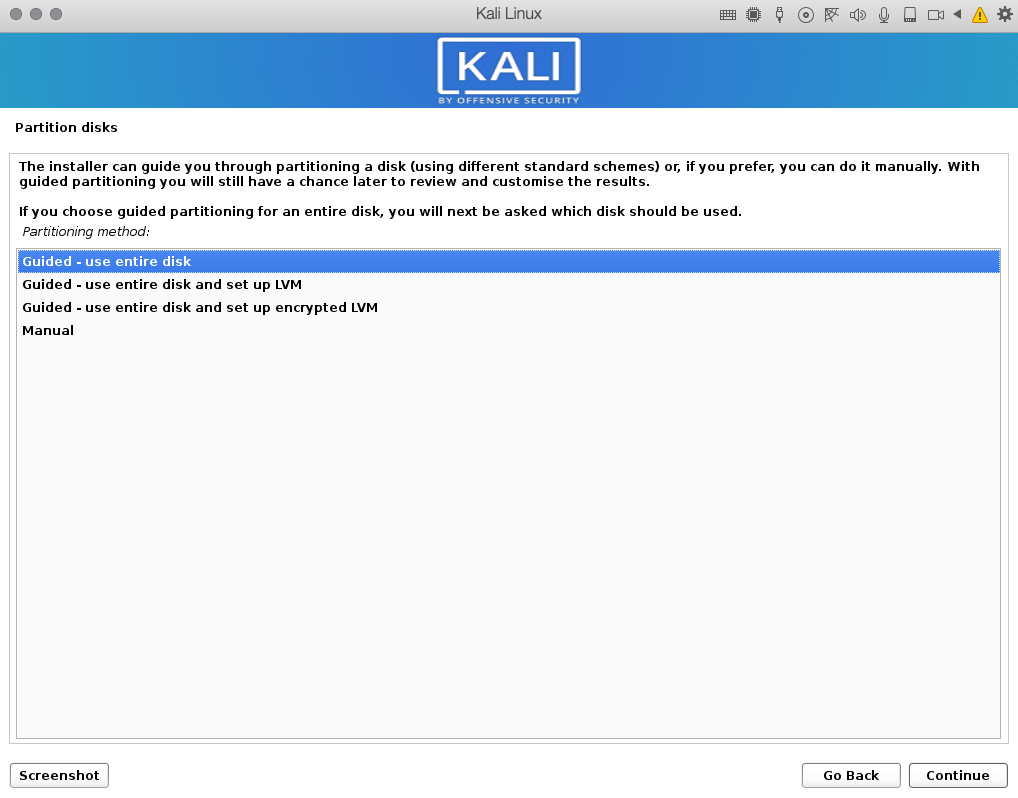
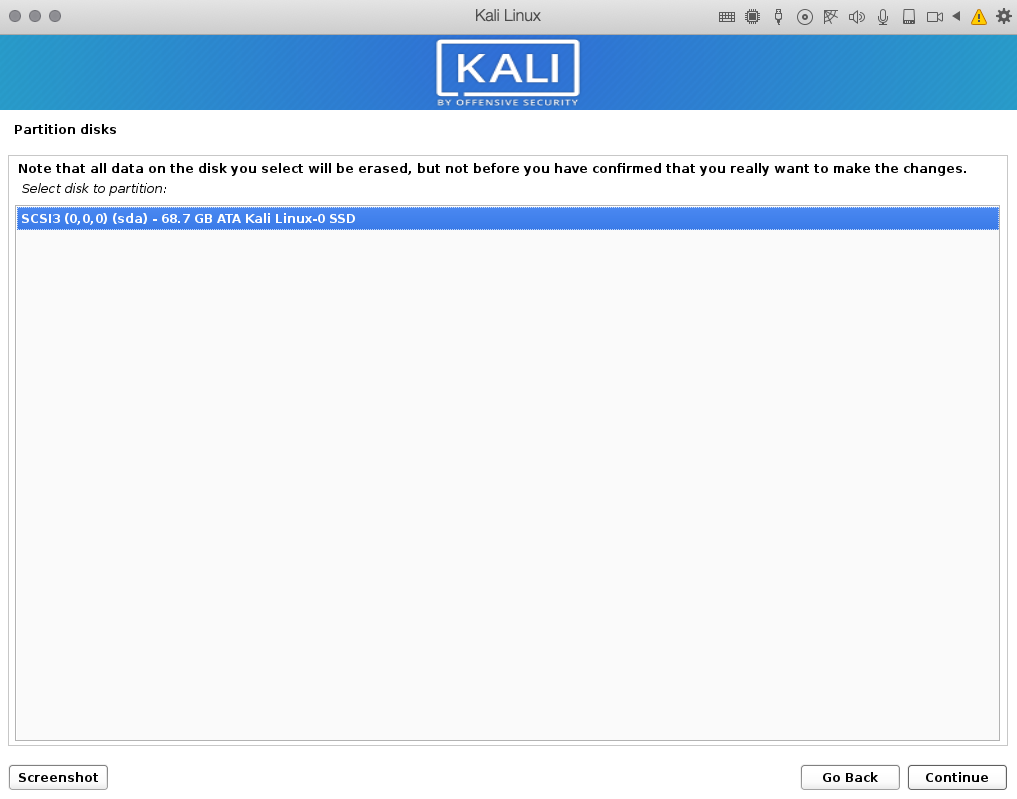
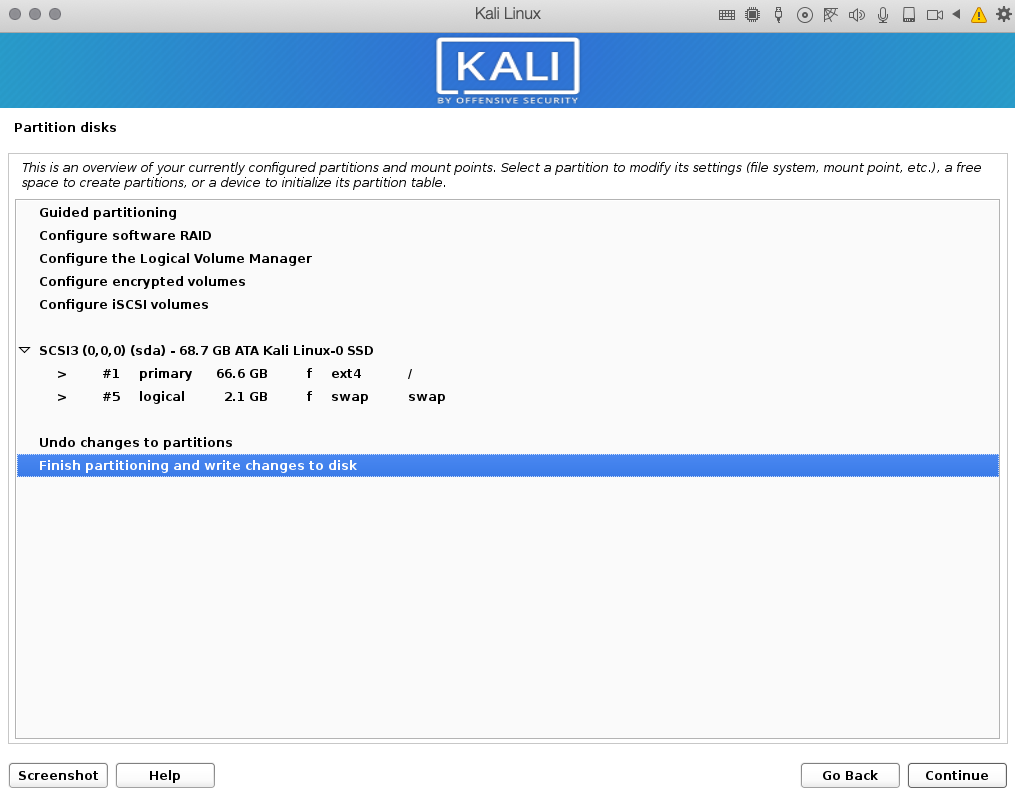
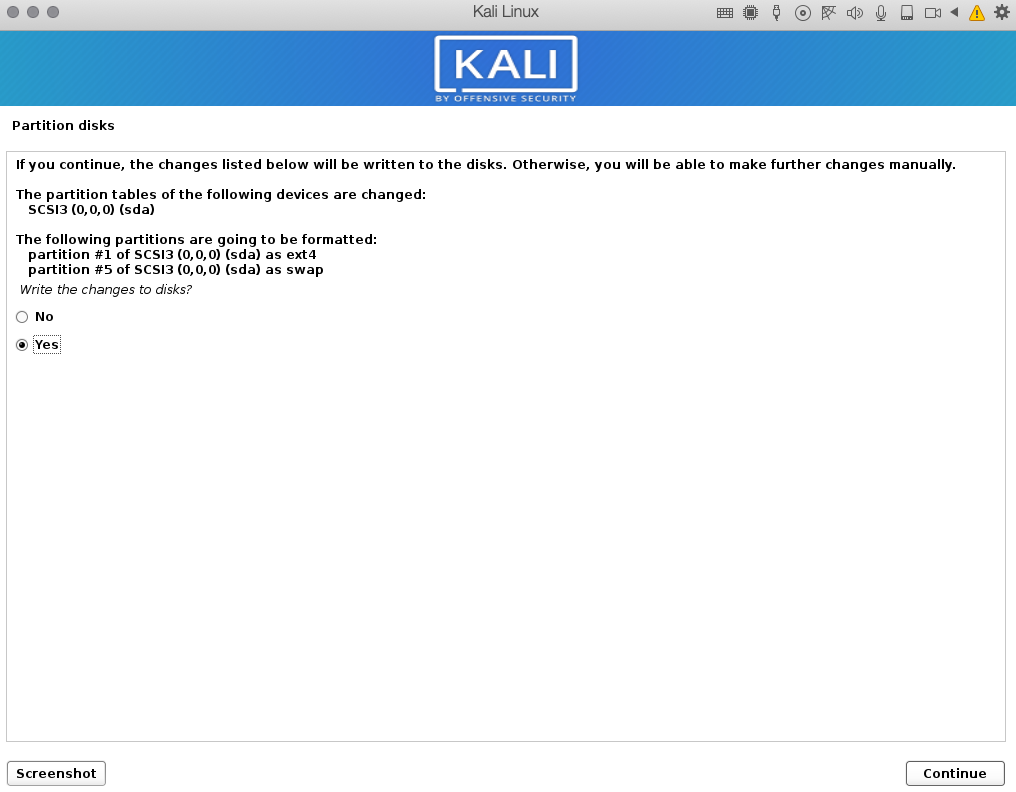
<h3><strong>11: Partition and format your virtual disk </strong></h3>
<p><strong>&#8211; please select: Guided &#8211; use entire disk</strong></p>
<p><a href="https://itblogsec.com/wp-content/uploads/2020/05/Screenshot-2020-04-29-at-16.07.57.png" data-rel="penci-gallery-image-content" ><img loading="lazy" decoding="async" class="aligncenter size-full wp-image-1262" src="https://itblogsec.com/wp-content/uploads/2020/05/Screenshot-2020-04-29-at-16.07.57.png" alt="" width="1018" height="798" srcset="https://itblogsec.com/wp-content/uploads/2020/05/Screenshot-2020-04-29-at-16.07.57.png 1018w, https://itblogsec.com/wp-content/uploads/2020/05/Screenshot-2020-04-29-at-16.07.57-300x235.png 300w, https://itblogsec.com/wp-content/uploads/2020/05/Screenshot-2020-04-29-at-16.07.57-768x602.png 768w" sizes="(max-width: 1018px) 100vw, 1018px" /></a> <a href="https://itblogsec.com/wp-content/uploads/2020/05/Screenshot-2020-04-29-at-16.08.13.png" data-rel="penci-gallery-image-content" ><img loading="lazy" decoding="async" class="aligncenter size-large wp-image-1263" src="https://itblogsec.com/wp-content/uploads/2020/05/Screenshot-2020-04-29-at-16.08.13.png" alt="" width="1017" height="799" srcset="https://itblogsec.com/wp-content/uploads/2020/05/Screenshot-2020-04-29-at-16.08.13.png 1017w, https://itblogsec.com/wp-content/uploads/2020/05/Screenshot-2020-04-29-at-16.08.13-300x236.png 300w, https://itblogsec.com/wp-content/uploads/2020/05/Screenshot-2020-04-29-at-16.08.13-768x603.png 768w" sizes="(max-width: 1017px) 100vw, 1017px" /></a> <a href="https://itblogsec.com/wp-content/uploads/2020/05/Screenshot-2020-04-29-at-16.08.25.png" data-rel="penci-gallery-image-content" ><img loading="lazy" decoding="async" class="aligncenter size-large wp-image-1264" src="https://itblogsec.com/wp-content/uploads/2020/05/Screenshot-2020-04-29-at-16.08.25.png" alt="" width="1016" height="797" srcset="https://itblogsec.com/wp-content/uploads/2020/05/Screenshot-2020-04-29-at-16.08.25.png 1016w, https://itblogsec.com/wp-content/uploads/2020/05/Screenshot-2020-04-29-at-16.08.25-300x235.png 300w, https://itblogsec.com/wp-content/uploads/2020/05/Screenshot-2020-04-29-at-16.08.25-768x602.png 768w" sizes="(max-width: 1016px) 100vw, 1016px" /></a> <a href="https://itblogsec.com/wp-content/uploads/2020/05/Screenshot-2020-04-29-at-16.08.36.png" data-rel="penci-gallery-image-content" ><img loading="lazy" decoding="async" class="aligncenter size-large wp-image-1265" src="https://itblogsec.com/wp-content/uploads/2020/05/Screenshot-2020-04-29-at-16.08.36.png" alt="" width="1015" height="798" srcset="https://itblogsec.com/wp-content/uploads/2020/05/Screenshot-2020-04-29-at-16.08.36.png 1015w, https://itblogsec.com/wp-content/uploads/2020/05/Screenshot-2020-04-29-at-16.08.36-300x236.png 300w, https://itblogsec.com/wp-content/uploads/2020/05/Screenshot-2020-04-29-at-16.08.36-768x604.png 768w" sizes="(max-width: 1015px) 100vw, 1015px" /></a> <a href="https://itblogsec.com/wp-content/uploads/2020/05/Screenshot-2020-04-29-at-16.08.56.png" data-rel="penci-gallery-image-content" ><img loading="lazy" decoding="async" class="aligncenter size-large wp-image-1266" src="https://itblogsec.com/wp-content/uploads/2020/05/Screenshot-2020-04-29-at-16.08.56.png" alt="" width="1016" height="792" srcset="https://itblogsec.com/wp-content/uploads/2020/05/Screenshot-2020-04-29-at-16.08.56.png 1016w, https://itblogsec.com/wp-content/uploads/2020/05/Screenshot-2020-04-29-at-16.08.56-300x234.png 300w, https://itblogsec.com/wp-content/uploads/2020/05/Screenshot-2020-04-29-at-16.08.56-768x599.png 768w" sizes="(max-width: 1016px) 100vw, 1016px" /></a></p>
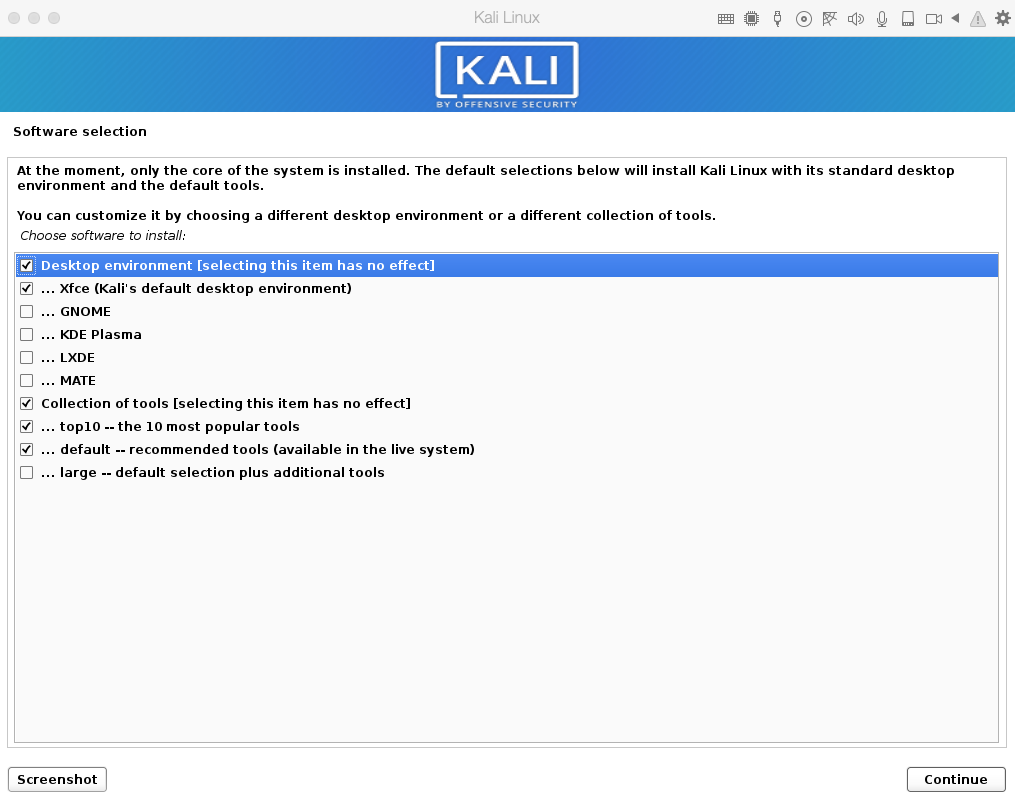
<h3><strong>12: Select software you want to install </strong></h3>
<p><strong>&#8211; of course later you can install any kind of software you want</strong></p>
<p><a href="https://itblogsec.com/wp-content/uploads/2020/05/Screenshot-2020-04-29-at-16.20.34.png" data-rel="penci-gallery-image-content" ><img loading="lazy" decoding="async" class="aligncenter size-full wp-image-1267" src="https://itblogsec.com/wp-content/uploads/2020/05/Screenshot-2020-04-29-at-16.20.34.png" alt="" width="1015" height="800" srcset="https://itblogsec.com/wp-content/uploads/2020/05/Screenshot-2020-04-29-at-16.20.34.png 1015w, https://itblogsec.com/wp-content/uploads/2020/05/Screenshot-2020-04-29-at-16.20.34-300x236.png 300w, https://itblogsec.com/wp-content/uploads/2020/05/Screenshot-2020-04-29-at-16.20.34-768x605.png 768w" sizes="(max-width: 1015px) 100vw, 1015px" /></a></p>
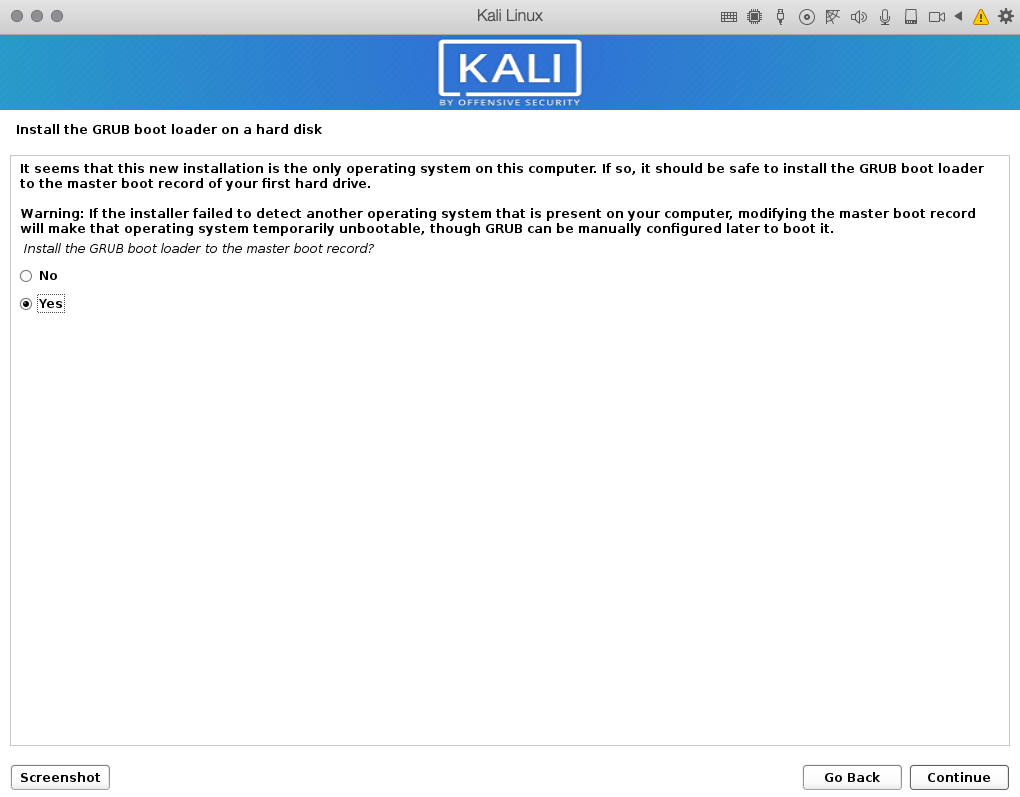
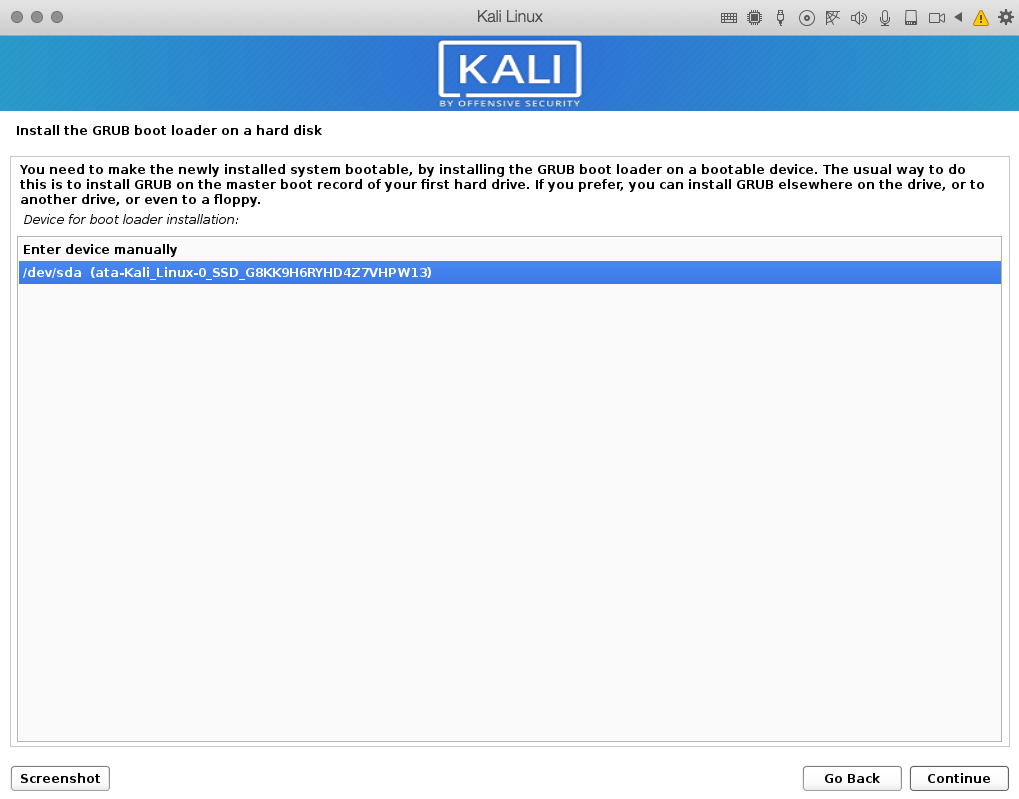
<h3><strong>13: Install GRUB boot loader</strong></h3>
<p><a href="https://itblogsec.com/wp-content/uploads/2020/05/Screenshot-2020-04-29-at-16.45.13.png" data-rel="penci-gallery-image-content" ><img loading="lazy" decoding="async" class="aligncenter size-full wp-image-1268" src="https://itblogsec.com/wp-content/uploads/2020/05/Screenshot-2020-04-29-at-16.45.13.png" alt="" width="1020" height="797" srcset="https://itblogsec.com/wp-content/uploads/2020/05/Screenshot-2020-04-29-at-16.45.13.png 1020w, https://itblogsec.com/wp-content/uploads/2020/05/Screenshot-2020-04-29-at-16.45.13-300x234.png 300w, https://itblogsec.com/wp-content/uploads/2020/05/Screenshot-2020-04-29-at-16.45.13-768x600.png 768w" sizes="(max-width: 1020px) 100vw, 1020px" /></a> <a href="https://itblogsec.com/wp-content/uploads/2020/05/Screenshot-2020-04-29-at-16.45.28.png" data-rel="penci-gallery-image-content" ><img loading="lazy" decoding="async" class="aligncenter size-full wp-image-1269" src="https://itblogsec.com/wp-content/uploads/2020/05/Screenshot-2020-04-29-at-16.45.28.png" alt="" width="1019" height="793" srcset="https://itblogsec.com/wp-content/uploads/2020/05/Screenshot-2020-04-29-at-16.45.28.png 1019w, https://itblogsec.com/wp-content/uploads/2020/05/Screenshot-2020-04-29-at-16.45.28-300x233.png 300w, https://itblogsec.com/wp-content/uploads/2020/05/Screenshot-2020-04-29-at-16.45.28-768x598.png 768w" sizes="(max-width: 1019px) 100vw, 1019px" /></a> <a href="https://itblogsec.com/wp-content/uploads/2020/05/Screenshot-2020-04-29-at-16.45.42.png" data-rel="penci-gallery-image-content" ><img loading="lazy" decoding="async" class="aligncenter size-full wp-image-1270" src="https://itblogsec.com/wp-content/uploads/2020/05/Screenshot-2020-04-29-at-16.45.42.png" alt="" width="1019" height="799" srcset="https://itblogsec.com/wp-content/uploads/2020/05/Screenshot-2020-04-29-at-16.45.42.png 1019w, https://itblogsec.com/wp-content/uploads/2020/05/Screenshot-2020-04-29-at-16.45.42-300x235.png 300w, https://itblogsec.com/wp-content/uploads/2020/05/Screenshot-2020-04-29-at-16.45.42-768x602.png 768w" sizes="(max-width: 1019px) 100vw, 1019px" /></a><strong> </strong></p>
<h3><strong>14: Wait for installation to be finished</strong></h3>
<p><a href="https://itblogsec.com/wp-content/uploads/2020/05/Screenshot-2020-04-29-at-16.47.32.png" data-rel="penci-gallery-image-content" ><img loading="lazy" decoding="async" class="aligncenter size-full wp-image-1271" src="https://itblogsec.com/wp-content/uploads/2020/05/Screenshot-2020-04-29-at-16.47.32.png" alt="" width="1018" height="799" srcset="https://itblogsec.com/wp-content/uploads/2020/05/Screenshot-2020-04-29-at-16.47.32.png 1018w, https://itblogsec.com/wp-content/uploads/2020/05/Screenshot-2020-04-29-at-16.47.32-300x235.png 300w, https://itblogsec.com/wp-content/uploads/2020/05/Screenshot-2020-04-29-at-16.47.32-768x603.png 768w" sizes="(max-width: 1018px) 100vw, 1018px" /></a></p>
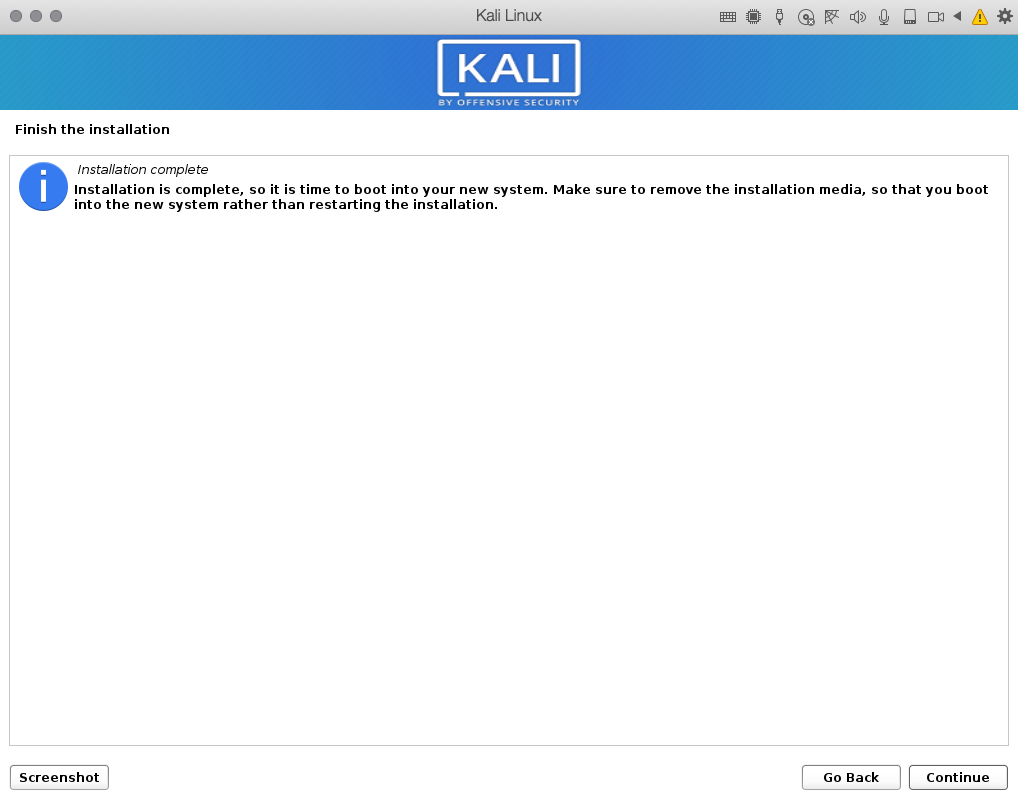
<h3><strong>15: Congratulations! We are done.</strong></h3>
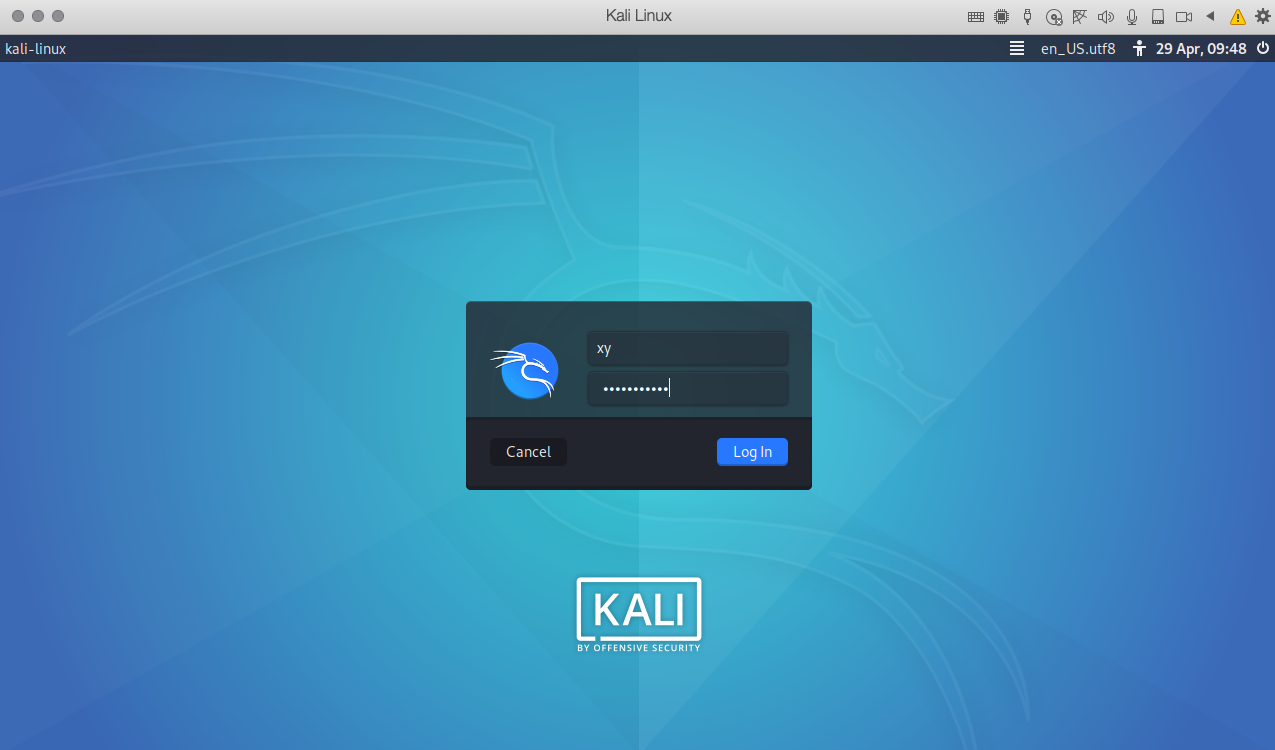
<p><strong>&#8211; Now your Kali linux system is ready to be used for your hacking practice </strong></p>
<p><a href="https://itblogsec.com/wp-content/uploads/2020/05/Screenshot-2020-04-29-at-16.48.31.png" data-rel="penci-gallery-image-content" ><img loading="lazy" decoding="async" class="aligncenter size-large wp-image-1272" src="https://itblogsec.com/wp-content/uploads/2020/05/Screenshot-2020-04-29-at-16.48.31-1024x602.png" alt="" width="1024" height="602" srcset="https://itblogsec.com/wp-content/uploads/2020/05/Screenshot-2020-04-29-at-16.48.31-1024x602.png 1024w, https://itblogsec.com/wp-content/uploads/2020/05/Screenshot-2020-04-29-at-16.48.31-300x176.png 300w, https://itblogsec.com/wp-content/uploads/2020/05/Screenshot-2020-04-29-at-16.48.31-768x452.png 768w, https://itblogsec.com/wp-content/uploads/2020/05/Screenshot-2020-04-29-at-16.48.31.png 1275w" sizes="(max-width: 1024px) 100vw, 1024px" /></a> <a href="https://itblogsec.com/wp-content/uploads/2020/05/Screenshot-2020-04-29-at-16.49.38.png" data-rel="penci-gallery-image-content" ><img loading="lazy" decoding="async" class="aligncenter size-large wp-image-1273" src="https://itblogsec.com/wp-content/uploads/2020/05/Screenshot-2020-04-29-at-16.49.38-1024x603.png" alt="" width="1024" height="603" srcset="https://itblogsec.com/wp-content/uploads/2020/05/Screenshot-2020-04-29-at-16.49.38-1024x603.png 1024w, https://itblogsec.com/wp-content/uploads/2020/05/Screenshot-2020-04-29-at-16.49.38-300x177.png 300w, https://itblogsec.com/wp-content/uploads/2020/05/Screenshot-2020-04-29-at-16.49.38-768x452.png 768w, https://itblogsec.com/wp-content/uploads/2020/05/Screenshot-2020-04-29-at-16.49.38.png 1276w" sizes="(max-width: 1024px) 100vw, 1024px" /></a></p>
<h3>Conclusion</h3>
<p>At this point, you have the system which is ready to learn new hacking practice by yourself. In our next tutorials, we will try to bring you step-by-step guides how to learn ethical hacking practices. Stay tuned, like us on facebook and soon there will second part of <strong>Hacking for Beginners</strong> available. </p>
<p>The post <a href="https://itblogsec.com/hacking-for-beginners-1-install-the-kali-linux/">Hacking for beginners #1 &#8211; Install the Kali Linux</a> appeared first on <a href="https://itblogsec.com">ITBlogSec.com</a>.</p>
]]></content>
		
					<link rel="replies" type="text/html" href="https://itblogsec.com/hacking-for-beginners-1-install-the-kali-linux/#comments" thr:count="0" />
			<link rel="replies" type="application/atom+xml" href="https://itblogsec.com/hacking-for-beginners-1-install-the-kali-linux/feed/atom/" thr:count="0" />
			<thr:total>0</thr:total>
			</entry>
		<entry>
		<author>
			<name>admin</name>
					</author>

		<title type="html"><![CDATA[Improving the Website Speed of a Media-Heavy Website]]></title>
		<link rel="alternate" type="text/html" href="https://itblogsec.com/improving-the-website-speed-of-a-media-heavy-website/" />

		<id>https://itblogsec.com/?p=1196</id>
		<updated>2019-08-14T19:04:39Z</updated>
		<published>2019-08-14T19:04:39Z</published>
		<category scheme="https://itblogsec.com/" term="How to" /><category scheme="https://itblogsec.com/" term="website" />
		<summary type="html"><![CDATA[<p>The common mindset when it comes to considering a website’s success is that owners need only worry about the type of content they want to publish. However, times have changed drastically, and so have consumers. There are now several factors that determine the success of a website. One of those is website speed.</p>
<p>The post <a href="https://itblogsec.com/improving-the-website-speed-of-a-media-heavy-website/">Improving the Website Speed of a Media-Heavy Website</a> appeared first on <a href="https://itblogsec.com">ITBlogSec.com</a>.</p>
]]></summary>

					<content type="html" xml:base="https://itblogsec.com/improving-the-website-speed-of-a-media-heavy-website/"><![CDATA[<h3 style="text-align: justify;">Improving the Website Speed of a Media-Heavy Website</h3>
<p style="text-align: justify;">The common mindset when it comes to considering a website’s success is that owners need only worry about the <strong>type of content they want to publish</strong>. However, times have changed drastically, and so have consumers. There are now <strong>several factors that determine the success</strong> of a website. <strong>One of those is website speed.</strong></p>
<p style="text-align: justify;">Website speed is essentially <strong>the time in which an entire page loads</strong> after being clicked. At this age, when internet speeds are reaching new heights, consumers won’t accept websites that take more than a few seconds to load. For <strong>image</strong> or <strong>media-heavy</strong> websites, increasing movement speed is a hard task. However, with a few simple tips, load times can be reduced dramatically.</p>
<p>Please check also a very interesting article <strong><a href="https://itblogsec.com/web-server-performance-benchmark-for-free/" target="_blank" rel="noopener noreferrer">Web server performance benchmark for free.</a></strong></p>
<h5 style="text-align: justify;"><strong>Avoid Auto-Play Videos</strong></h5>
<p style="text-align: justify;">Auto-play videos are despised by people for two reasons. The first is that it’s <strong>annoying to have a video pop up</strong> when you open a page. Another reason is that these videos hinder page loading time, as it takes a lot of resources and bandwidth to start the video. While <strong><a href="https://www.zdnet.com/article/hate-noisy-autoplaying-videos-google-chrome-will-finally-block-them-by-default/" target="_blank" rel="noopener noreferrer">Google and Apple cracked down</a> </strong>on such videos last year, they are still present on some websites.</p>
<p style="text-align: justify;">It’s best <strong>to avoid adding auto-play videos</strong> to satisfy the visitors of a website and to keep the <strong>website’s performance in top</strong> condition all at once. It’s best to give the visitors the option of watching a video instead of forcing them to watch it immediately.</p>
<h5 style="text-align: justify;"><strong>Use Appropriately Sized Images</strong></h5>
<p style="text-align: justify;">What most new website owners don’t know is that each website has its own proper dimensions for an image. For instance, there are some <strong>websites that use 900x1800px images</strong> whereas their website <strong>can only handle 300&#215;600 images.</strong> This forces the website to load more than it can handle, thus greatly affecting the speed.</p>
<p style="text-align: justify;">The right way to change the dimensions of an <strong>image is through the server-side of the website.</strong> Once done, those changes will be applied directly on the front-end. Understandably, some images may suffer from the smaller dimensions but visitors will prefer <strong>a lighting speed website</strong> over one with large images.</p>
<h5 style="text-align: justify;"><strong>Use the Right Image Format</strong></h5>
<p style="text-align: justify;">The most common image formats online are <strong>JPG</strong> and <strong>PNG</strong>. However, most web developers now prefer the new <strong><a href="https://insanelab.com/blog/web-development/webp-web-design-vs-jpeg-gif-png/" target="_blank" rel="noopener noreferrer">WebP</a></strong> format as it takes the best out of both JPG and PNG.</p>
<p style="text-align: justify;">In terms of compatibility, WebP is available for Chrome and Opera users, but it isn’t technically a universal format yet. Compared to PNG, <strong>WebP offers 26% smaller file sizes</strong> without sacrificing quality. Compared to JPG, it offers 25-35% smaller file sizes on the same image quality. That means <strong>WebP images will load faster</strong> than both of these formats every time.</p>
<h5 style="text-align: justify;"><strong>Optimize for Mobile</strong></h5>
<p style="text-align: justify;">A lot of web developers also forget to <strong>optimize their website for mobile platforms.</strong> Whenever a user visits a website that’s not optimized for <strong>mobile devices</strong>, that page will begin loading a desktop version which will take more time to load.</p>
<p style="text-align: justify;">Most web development platforms now have a <strong>feature that automatically optimizes a website for mobile use.</strong> These are great, as it takes a considerable amount of time to create a mobile version of a website. When mobile optimization happens, images are reduced drastically to accommodate the smaller screens of smartphones.</p>
<h5 style="text-align: justify;"><strong>Pick the Right Media</strong></h5>
<p style="text-align: justify;">In most cases, web developers have to make sacrifices regarding content. One of the sure ways to reduce loading speed is to <strong>simply reduce the amount of content that needs to load in a website.</strong> Website owners should carefully sift through their images and videos to see <strong>which ones aren’t exactly needed</strong> and could be <strong>removed</strong> to make way for loading speed.</p>
<p style="text-align: justify;">It’s also important to browse through the website to see if there are any <strong>images or videos that load several times on one page</strong>. Each piece of unnecessary media removed results in better loading times even if it&#8217;s just a fraction of a second.</p>
<p style="text-align: justify;">These <strong>tips combined will radically improve the loading speed</strong> of a website.</p>
<h5 style="text-align: justify;"><strong>But why is it important?</strong></h5>
<p style="text-align: justify;">According to <a href="https://hostingtribunal.com/blog/how-speed-affects-website/" target="_blank" rel="noopener noreferrer">recent statistics</a>, people <strong>leave websites</strong> that take <strong>over three seconds to load</strong>. This basically means that a <strong>website loses profit if it continues to perform slowly</strong>. This is just one figure that dictates the importance of website speed. These statistics show the eye-opening figures regarding <strong>how speed affects a website’s overall performance.</strong></p>
<p>Please check also interesting article: <strong><a href="https://itblogsec.com/10-of-the-best-plugins-to-keep-your-wordpress-site-safe/" target="_blank" rel="noopener noreferrer">10 of the best plugins to keep your Wordpress site safe.</a></strong></p>
<p><span style="font-size: 10pt;"><strong>source:</strong> <a href="https://hostingtribunal.com/blog/how-speed-affects-website/" target="_blank" rel="noopener noreferrer">https://hostingtribunal.com/</a></span></p>
<p>The post <a href="https://itblogsec.com/improving-the-website-speed-of-a-media-heavy-website/">Improving the Website Speed of a Media-Heavy Website</a> appeared first on <a href="https://itblogsec.com">ITBlogSec.com</a>.</p>
]]></content>
		
					<link rel="replies" type="text/html" href="https://itblogsec.com/improving-the-website-speed-of-a-media-heavy-website/#comments" thr:count="0" />
			<link rel="replies" type="application/atom+xml" href="https://itblogsec.com/improving-the-website-speed-of-a-media-heavy-website/feed/atom/" thr:count="0" />
			<thr:total>0</thr:total>
			</entry>
		<entry>
		<author>
			<name>admin</name>
					</author>

		<title type="html"><![CDATA[20+ Website Load Time Statistics [Infographic – How Speed Affects Your Website]]]></title>
		<link rel="alternate" type="text/html" href="https://itblogsec.com/20-website-load-time-statistics-infographic-how-speed-affects-your-website/" />

		<id>https://itblogsec.com/?p=1185</id>
		<updated>2019-08-06T14:26:06Z</updated>
		<published>2019-08-06T14:22:34Z</published>
		<category scheme="https://itblogsec.com/" term="News" /><category scheme="https://itblogsec.com/" term="website" />
		<summary type="html"><![CDATA[<p>Speed is essential. There is no denying that a quick, nimble web page trumps a slow site. Both users and search engines know that. Website load time statistics from numerous studies clearly show that if the average page load time exceeds 3 seconds, the abandonment rates soar. High bounce rates telegraph to search engines that visitors don’t find the website useful, which affects the ranking directly.</p>
<p>The post <a href="https://itblogsec.com/20-website-load-time-statistics-infographic-how-speed-affects-your-website/">20+ Website Load Time Statistics [Infographic – How Speed Affects Your Website]</a> appeared first on <a href="https://itblogsec.com">ITBlogSec.com</a>.</p>
]]></summary>

					<content type="html" xml:base="https://itblogsec.com/20-website-load-time-statistics-infographic-how-speed-affects-your-website/"><![CDATA[<h2 class="text-dark">20+ Website Load Time Statistics [Infographic – How Speed Affects Your Website]</h2>
<p><strong>Speed</strong> is essential. There is no denying that a quick, nimble web page trumps a slow site. Both users and search engines know that. <strong>Website load time statistics</strong> from numerous studies clearly show that if the average page load time exceeds 3 seconds, the abandonment rates soar. <strong>High bounce rates</strong> telegraph to search engines that visitors don’t find the website useful, which affects the ranking directly.</p>
<h4>The most remarkable 1-second stats:</h4>
<ul>
<li>1 second delay reduces page views by 11%</li>
<li>1 second delay decreases customer satisfaction by 16%</li>
<li>1 second delay eats away 7% of the coveted conversion rate</li>
<li>On annual basis, 1 second delay can lead to $2.5 million in missed revenue if your shop generates $100,000 per day</li>
</ul>
<h4><b><strong>What Is a Good Page Load Speed</strong><strong>?</strong></b></h4>
<p style="text-align: justify;">Quick pages are the standard. 2-3 seconds load time is tolerable, anything beyond the fourth already compromises the end user experience. Like it or not, a whopping 79% of online shoppers state that any performance hiccup will make them stay away from an online store. Worse yet, 44% would share the negative impression with friends online. As is the case with so many other things, the Hitchhiker’s Guide to the Galaxy is spot on about the velocity of bad news.<img loading="lazy" decoding="async" class="aligncenter" src="https://hostingtribunal.com/wp-content/uploads/2018/09/Website-Speed-IG.jpg" alt="" width="800" height="15331" /></p>
<p>The post <a href="https://itblogsec.com/20-website-load-time-statistics-infographic-how-speed-affects-your-website/">20+ Website Load Time Statistics [Infographic – How Speed Affects Your Website]</a> appeared first on <a href="https://itblogsec.com">ITBlogSec.com</a>.</p>
]]></content>
		
					<link rel="replies" type="text/html" href="https://itblogsec.com/20-website-load-time-statistics-infographic-how-speed-affects-your-website/#comments" thr:count="0" />
			<link rel="replies" type="application/atom+xml" href="https://itblogsec.com/20-website-load-time-statistics-infographic-how-speed-affects-your-website/feed/atom/" thr:count="0" />
			<thr:total>0</thr:total>
			</entry>
		<entry>
		<author>
			<name>admin</name>
					</author>

		<title type="html"><![CDATA[Office 365 Migration Using New &#8211; MoveRequest cmdlets]]></title>
		<link rel="alternate" type="text/html" href="https://itblogsec.com/office-365-migration-using-new-moverequest-cmdlets/" />

		<id>https://itblogsec.com/?p=1178</id>
		<updated>2019-08-05T14:11:14Z</updated>
		<published>2019-08-05T14:08:57Z</published>
		<category scheme="https://itblogsec.com/" term="How to" /><category scheme="https://itblogsec.com/" term="exchange" /><category scheme="https://itblogsec.com/" term="office365" />
		<summary type="html"><![CDATA[<p>When you are working in a hybrid environment where both on-premises Exchange Server and Office 365 are available, then it becomes beneficial for the Exchange Administrator to migrate some user mailboxes to Office 365 from Exchange Server because it provides much flexibility to access mailboxes from anywhere.</p>
<p>The post <a href="https://itblogsec.com/office-365-migration-using-new-moverequest-cmdlets/">Office 365 Migration Using New &#8211; MoveRequest cmdlets</a> appeared first on <a href="https://itblogsec.com">ITBlogSec.com</a>.</p>
]]></summary>

					<content type="html" xml:base="https://itblogsec.com/office-365-migration-using-new-moverequest-cmdlets/"><![CDATA[<h2>Office 365 Migration Using New &#8211; MoveRequest cmdlets</h2>
<p style="text-align: justify;">When you are working in a <strong>hybrid environment</strong> where both on-premises <strong>Exchange Server</strong> and <strong>Office 365</strong> are available, then it becomes beneficial for the Exchange Administrator to <strong>migrate some user mailboxes to Office 365</strong> from Exchange Server because it provides much flexibility to access mailboxes from anywhere.</p>
<p style="text-align: justify;">Now there are <strong>two methods</strong> which you can employ for the migration. First one is using the <strong>Exchange Admin Center</strong> where you create the migration endpoint and perform the batch migration. The second method is <strong>using the Exchange PowerShell command (using the MoveRequest)</strong> to migrate the batches mailboxes.</p>
<p style="text-align: justify;">To get the complete information regarding the migration, we will go through the migration process using Exchange Management Shell commands. </p>
<h3 style="text-align: justify;">Complete process:</h3>
<ol style="text-align: justify;">
<li>First, start the Exchange Management Shell.</li>
<li>Run the command:<br />
<strong><em>Set-ExecutionPolicy Unrestricted</em></strong></li>
</ol>
<p style="text-align: justify;">The command will allow you to run each kind of script even if it is digitally signed or not. It will ask you to make a choice, click Y.</p>
<ol style="text-align: justify;" start="3">
<li>Now, run the next command:<br />
<strong><em>$livecred = Get-Credential</em></strong></li>
</ol>
<p style="text-align: justify;">The command opens a login console where you need to input the Exchange Online credentials of the Administrator account to the $livecred variable.</p>
<ol style="text-align: justify;" start="4">
<li>Run the next command:<br />
<strong><em>$s = New-PSSession -ConfigurationName Microsoft.Exchange -ConnectionUri https://outlook.office365.com/powershell-liveid/ -Credential $cred -Authentication Basic -AllowRedirection</em></strong></li>
</ol>
<p style="text-align: justify;">The command first asks you to input the Administrator credentials, and then input the credential to create a new session.</p>
<ol style="text-align: justify;" start="5">
<li>Run the next command:<br />
<strong><em>$importresults= Import-PSSession $s</em></strong></li>
</ol>
<p style="text-align: justify;">The command will import the session to the respective variable. The process will take some seconds to complete. Just wait for a little and let it complete.</p>
<ol style="text-align: justify;" start="6">
<li>When you have created a session with the Exchange Online, you can start the move request:<br />
<strong><em>New-MoveRequest -Identity “Tony” -Remote -RemoteHostName “localmailserver.mydomain.com” -TargetDeliveryDomain mydomain.mail.onmicrosoft.com -RemoteCredential $importresults</em></strong></li>
</ol>
<ol style="text-align: justify;" start="7">
<li>Monitor the move request using the following command:<br />
<strong><em>Get-MoveRequest | Get-MoveRequestStatistics  </em></strong></li>
</ol>
<p style="text-align: justify;">The command will bring the details of the ongoing move request.</p>
<ol style="text-align: justify;" start="8">
<li>After completing the migration from Exchange to Office 365, you can remove the move request:<br />
<strong><em>Get-MoveRequest | Remove-MoveRequest  </em></strong></li>
</ol>
<h3 style="text-align: justify;"><strong>Important parameters:</strong></h3>
<p style="text-align: justify;">The MoveRequest command uses multiple parameters which are useful for different move request between a variety of source and destinations. Some of them are present below:</p>
<p style="text-align: justify;"><strong>AllowLargeItems<br />
</strong>It will allow you to mention the larger mailbox items than the target mailbox limit. You do not need to input value while using the parameter, and the data will be copied with any loss. The parameter is available only in on-premises Exchange Server.</p>
<p style="text-align: justify;"><strong>ArchiveOnly<br />
</strong>This parameter specifies that the user is moving only the archive folder associated with the mailbox.</p>
<p style="text-align: justify;"><strong>BadItemLimit<br />
</strong>It is an important parameter when the size of the mailbox or database is quite large; then there are chances that some items not suitable for migration. It specifies the total number of bad items before the move request fails. Missing or deleted items from the source mailbox are also counted as bad items and considered as not suitable for the migration.</p>
<p style="text-align: justify;"><strong>CompletedRequestAgeLimit<br />
</strong>The parameter notifies the total number of days after which the move request will get deleted automatically. The default limit is 30 days, and you can change it depending on your requirement.</p>
<p style="text-align: justify;"><strong>Identity<br />
</strong>Identity parameter specifies the name of the mailbox or user. Here, you can use Alias, SMTP address, Distinguished Name, User Principal Name (UPN).</p>
<p style="text-align: justify;"><strong>PrimaryOnly<br />
</strong>The PrimaryOnly parameter denotes that the move request migrates only the primary mailbox excluding the personal archive. Use this parameter only when there is a personal archive that need not be migrated.</p>
<h3 style="text-align: justify;"><strong>Conclusion</strong></h3>
<p style="text-align: justify;">Microsoft provides all the necessary methods to perform a secure Office 365 migration. But the complexity of these methods makes the job of Office 365 Administrator quite tough. But Kernel Migrator for Office 365 saves you from all these difficulties. As its name mentions, <a href="https://www.nucleustechnologies.com/office-365-migration/">Kernel Migrator for Office 365</a> is migration software for the Office 365 mailboxes, and public folders. It supports every plan of Office 365. You can perform a migration from Exchange to Office 365 or vice e versa. It provides suitable filters and scheduling options to run the migration under your control and provides a clean migration report after the migration.</p>
<p>The post <a href="https://itblogsec.com/office-365-migration-using-new-moverequest-cmdlets/">Office 365 Migration Using New &#8211; MoveRequest cmdlets</a> appeared first on <a href="https://itblogsec.com">ITBlogSec.com</a>.</p>
]]></content>
		
					<link rel="replies" type="text/html" href="https://itblogsec.com/office-365-migration-using-new-moverequest-cmdlets/#comments" thr:count="0" />
			<link rel="replies" type="application/atom+xml" href="https://itblogsec.com/office-365-migration-using-new-moverequest-cmdlets/feed/atom/" thr:count="0" />
			<thr:total>0</thr:total>
			</entry>
		<entry>
		<author>
			<name>admin</name>
					</author>

		<title type="html"><![CDATA[The Cyber Security Periscope at a Glance 2019 (INFOGRAPHIC)]]></title>
		<link rel="alternate" type="text/html" href="https://itblogsec.com/the-cyber-security-periscope-at-a-glance-2019-infographic/" />

		<id>https://itblogsec.com/?p=1168</id>
		<updated>2019-04-22T10:37:38Z</updated>
		<published>2019-04-22T10:08:43Z</published>
		<category scheme="https://itblogsec.com/" term="News" /><category scheme="https://itblogsec.com/" term="Other" /><category scheme="https://itblogsec.com/" term="cyber crime" /><category scheme="https://itblogsec.com/" term="cyber security" />
		<summary type="html"><![CDATA[<p>Cybersecurity will be a hot topic for as long as we are using computers and the internet. With the massive expansion of IoT devices, mobile, and technology in general, we can only expect to see this industry growing in the years to come to keep us safe from online thefts and data breaches. Let’s review some of the most common types of cyber attacks. You’ll be surprised when you see the stats and learn that this issue is much more serious than you probably thought.</p>
<p>The post <a href="https://itblogsec.com/the-cyber-security-periscope-at-a-glance-2019-infographic/">The Cyber Security Periscope at a Glance 2019 (INFOGRAPHIC)</a> appeared first on <a href="https://itblogsec.com">ITBlogSec.com</a>.</p>
]]></summary>

					<content type="html" xml:base="https://itblogsec.com/the-cyber-security-periscope-at-a-glance-2019-infographic/"><![CDATA[<h2 style="text-align: justify;">The Cyber Security Periscope at a Glance 2019 (INFOGRAPHIC)</h2>
<p dir="ltr" style="text-align: justify;"><strong>Cybersecurity</strong> will be a hot topic for as long as we are using computers and the internet. With the massive expansion of <strong>IoT devices</strong>, <strong>mobile</strong>, and technology in general, we can only expect to see this industry growing in the years to come to keep us safe from online thefts and <strong><a title="https://techjury.net/stats-about/biggest-data-breaches/" href="https://techjury.net/stats-about/biggest-data-breaches/">data breaches</a>.</strong></p>
<p dir="ltr" style="text-align: justify;">Let’s review some of the most common types of cyber attacks. You’ll be surprised when you see the stats and learn that this issue is much more serious than you probably thought.</p>
<div style="text-align: justify;">
<h5 dir="ltr"><strong>A Glance at the Statistics</strong></h5>
<p dir="ltr"><strong><em>Botnets</em><br />
</strong><a title="https://www.pandasecurity.com/mediacenter/security/what-is-a-botnet/" href="https://www.pandasecurity.com/mediacenter/security/what-is-a-botnet/">Robot networks or botnets</a> are groups of computers acting much like an army with the <strong>aim of attacking one specific computer or groups</strong> of computers.</p>
<p dir="ltr">Think in terms of the inverse proportion examples you saw in school. If you have one hacker trying to target a network, it may take her a year or more. If you have hundreds of computers sending multiple attacks, it will take much less time. Experts from TechJury contend that botnet use rose to 34% in Q1 of 2018.</p>
<p dir="ltr"><strong><em>Facebook Attacks</em><br />
</strong>If you use social media, then the chances are you use Facebook. By Q4 of 2018 alone, it had<strong> around 2.32 billion users</strong>. The sheer number of users is a huge call for <strong>online hackers</strong>. In September 2018, about <strong>50,000,000 accounts were affected</strong> by an attack.</p>
<p dir="ltr"><strong><em>Financial Statistics</em><br />
</strong>Estimates peg the cost of malware and phishing attacks as well as virus attacks on households at about $4.55. That is more than the GDP of a number of small countries.</p>
<p dir="ltr">Although that is a lot of money, the amount shouldn’t be too surprising because some of that cost comes from charges you only catch after a transaction. In a survey conducted in 2016, three years ago, 48% of participants actually responded that they had seen charges on their bank accounts that they weren’t privy to.</p>
<p dir="ltr">In the first half of 2018 alone, it is estimated that <strong>15% of the attacks were to gain financial access</strong> be it through a virus, malware, ransomware and so on and so forth. Just take a look at the infographic below that reveals some pretty startling statistics.</p>
<p dir="ltr"><strong><em>What’s Next?</em><br />
</strong>An integral part in solving any type of problem is knowing the root cause of the issue because that allows us to set up actions to combat the problem at hand. That is the absolute basic starting point of problem-solving.</p>
<p dir="ltr">What the statistics show are the areas where we are <strong>most vulnerable or have become more vulnerable.</strong> For example, the <strong>33% increase in mobile ransomware</strong> in 2018 tells us that mobile attacks are definitely an area we need to continue to look at.</p>
<p dir="ltr">Overall diligence, an understanding of vulnerability and continuing to search for better security protocols are strategies that look to be necessary for the long haul.</p>
<p><div style="width: 810px" class="wp-caption aligncenter"><img loading="lazy" decoding="async" src="https://techjury.net/wp-content/uploads/2019/02/infographic-world-cyber-V2.png" alt="" width="800" height="27502" /><p class="wp-caption-text">cybersecurity 2019</p></div>
</div>
<div style="text-align: justify;"><span style="font-size: 10pt;"><strong>source:</strong> <a title="https://techjury.net/stats-about/cyber-security/" href="https://techjury.net/stats-about/cyber-security/">https://techjury.net/stats-about/cyber-security/</a></span></div>
<p>The post <a href="https://itblogsec.com/the-cyber-security-periscope-at-a-glance-2019-infographic/">The Cyber Security Periscope at a Glance 2019 (INFOGRAPHIC)</a> appeared first on <a href="https://itblogsec.com">ITBlogSec.com</a>.</p>
]]></content>
		
					<link rel="replies" type="text/html" href="https://itblogsec.com/the-cyber-security-periscope-at-a-glance-2019-infographic/#comments" thr:count="0" />
			<link rel="replies" type="application/atom+xml" href="https://itblogsec.com/the-cyber-security-periscope-at-a-glance-2019-infographic/feed/atom/" thr:count="0" />
			<thr:total>0</thr:total>
			</entry>
		<entry>
		<author>
			<name>admin</name>
					</author>

		<title type="html"><![CDATA[Facts About Crypto Mining and Transactions Easily Explained 2019 (INFOGRAPHIC)]]></title>
		<link rel="alternate" type="text/html" href="https://itblogsec.com/facts-about-crypto-mining-and-transactions-easily-explained-2019-infographic/" />

		<id>https://itblogsec.com/?p=1154</id>
		<updated>2019-04-16T12:33:25Z</updated>
		<published>2019-04-08T12:36:56Z</published>
		<category scheme="https://itblogsec.com/" term="News" /><category scheme="https://itblogsec.com/" term="bitcoin" /><category scheme="https://itblogsec.com/" term="crypto" /><category scheme="https://itblogsec.com/" term="cryptocurrency" />
		<summary type="html"><![CDATA[<p>Cryptocurrency is comprised of a collection of fascinating technological innovations, both simple and complex. A peer-to-peer electronic cash system running on blockchain technology operates quite differently than traditional fiat money, and that may radically change how we handle finance.</p>
<p>The post <a href="https://itblogsec.com/facts-about-crypto-mining-and-transactions-easily-explained-2019-infographic/">Facts About Crypto Mining and Transactions Easily Explained 2019 (INFOGRAPHIC)</a> appeared first on <a href="https://itblogsec.com">ITBlogSec.com</a>.</p>
]]></summary>

					<content type="html" xml:base="https://itblogsec.com/facts-about-crypto-mining-and-transactions-easily-explained-2019-infographic/"><![CDATA[<h2>Facts About Crypto Mining and Transactions Easily Explained 2019 (INFOGRAPHIC)</h2>
<div>
<p dir="ltr" style="text-align: justify;">Have you ever wanted to learn more about how <strong>crypto coins</strong> are made and passed around? Maybe your job entails getting to know this topic better; or you’re looking to start dealing in cryptocurrency; or perhaps you’re just curious about the subject and would like to know more.</p>
<p dir="ltr" style="text-align: justify;">If the answer to these questions is “yes,” then have you tried doing so? To be sure, <strong>cryptocurrency is hardly a niche topic</strong> anymore, given how much money is involved in the technology. Thus, information about pretty much every aspect of cryptos is more than likely just a few clicks away. So <strong>getting educated on mining or transactions should be a piece of cake, right?</strong></p>
<p dir="ltr" style="text-align: justify;">Well, yes and no.</p>
<p dir="ltr" style="text-align: justify;">While there’s plenty to be found online about both mining and transactions, a lot of what you’ll come across isn’t exactly approachable by the general populace. While that may not present much of a problem for a good percent of people into the subject, many are put off when trying to inform themselves, only to hit a brick wall, so to speak.</p>
<p dir="ltr" style="text-align: justify;">Of course, there are articles and the like that <strong>go through mining and transactions step by step,</strong> giving you a comprehensive overview. However, these tend to be quite long, seeing that they have so much to cover and explain.</p>
<p dir="ltr" style="text-align: justify;">This kind of format is well and good, but some folks simply don’t have the time to wade through walls of text to get a clearer picture of what’s being discussed.</p>
<p dir="ltr" style="text-align: justify;">It becomes clear, then, that there needs to exist a source of information from which one can easily extract the exact definitions, numbers, or stats they’re looking for, without it being too complex to understand or too large to bother reading it.</p>
<p dir="ltr" style="text-align: justify;">And this awesome infographic created by <a href="https://bitcoinfy.net/" target="_blank" rel="noopener noreferrer">Bitcoinfy</a> is exactly that.</p>
<p dir="ltr" style="text-align: justify;">This graph tells you exactly what you need to know, without a ton of text to throw your time down the drain. On top of that, every piece of knowledge is presented in a simple to understand way, so that you can understand the point of each line.</p>
<p dir="ltr" style="text-align: justify;">The <strong>visual design helps</strong>, too. It <strong>uses colors</strong> that are easy on the eyes, and its crisp clear imagery doesn’t overstimulate your eyes. The facts are the star of this show, and the visuals do a great job complimenting them.</p>
<p dir="ltr" style="text-align: justify;"><strong>You probably won’t find a faster and better way to learn about crypto mining and transactions than this</strong>, so make sure you take advantage of that.</p>
</div>
<div style="text-align: justify;"><strong>source:</strong> <a href="https://bitcoinfy.net/crypto-transactions-and-mining/">https://bitcoinfy.net/crypto-transactions-and-mining/</a></div>
<div> </div>
<p><a href="https://itblogsec.com/wp-content/uploads/2019/04/crypto-transactions.png" data-rel="penci-gallery-image-content" ><img loading="lazy" decoding="async" class="aligncenter wp-image-1155 size-full" src="https://itblogsec.com/wp-content/uploads/2019/04/crypto-transactions.png" alt="" width="1067" height="17568" srcset="https://itblogsec.com/wp-content/uploads/2019/04/crypto-transactions.png 1067w, https://itblogsec.com/wp-content/uploads/2019/04/crypto-transactions-768x12645.png 768w" sizes="(max-width: 1067px) 100vw, 1067px" /></a></p>
<p><strong>source:</strong> <a href="https://bitcoinfy.net/" target="_blank" rel="noopener noreferrer">https://bitcoinfy.net/</a></p>
<p>The post <a href="https://itblogsec.com/facts-about-crypto-mining-and-transactions-easily-explained-2019-infographic/">Facts About Crypto Mining and Transactions Easily Explained 2019 (INFOGRAPHIC)</a> appeared first on <a href="https://itblogsec.com">ITBlogSec.com</a>.</p>
]]></content>
		
					<link rel="replies" type="text/html" href="https://itblogsec.com/facts-about-crypto-mining-and-transactions-easily-explained-2019-infographic/#comments" thr:count="1" />
			<link rel="replies" type="application/atom+xml" href="https://itblogsec.com/facts-about-crypto-mining-and-transactions-easily-explained-2019-infographic/feed/atom/" thr:count="1" />
			<thr:total>1</thr:total>
			</entry>
		<entry>
		<author>
			<name>admin</name>
					</author>

		<title type="html"><![CDATA[Watch Netflix content from wherever]]></title>
		<link rel="alternate" type="text/html" href="https://itblogsec.com/watch-netflix-content-from-wherever/" />

		<id>https://itblogsec.com/?p=1148</id>
		<updated>2019-01-28T19:19:51Z</updated>
		<published>2019-01-28T19:17:47Z</published>
		<category scheme="https://itblogsec.com/" term="How to" /><category scheme="https://itblogsec.com/" term="News" /><category scheme="https://itblogsec.com/" term="netflix" /><category scheme="https://itblogsec.com/" term="VPN" />
		<summary type="html"><![CDATA[<p>Netflix is one of the best resources for entertaining content today, as it offers a subscription to one of the largest libraries of movies and series. Everybody wants to watch Netflix, everybody wants to get the newest and the best content and enjoy their winter evenings with the favorite series characters. However, not everything is so simple. </p>
<p>The post <a href="https://itblogsec.com/watch-netflix-content-from-wherever/">Watch Netflix content from wherever</a> appeared first on <a href="https://itblogsec.com">ITBlogSec.com</a>.</p>
]]></summary>

					<content type="html" xml:base="https://itblogsec.com/watch-netflix-content-from-wherever/"><![CDATA[<h2>Watch Netflix content from wherever</h2>
<p style="text-align: left;">Netflix is one of the best resources for <strong>entertaining</strong> <strong>content today</strong>, as it offers a subscription to one of the largest libraries of <strong>movies</strong> and <strong>series</strong>. Everybody wants to watch Netflix, everybody wants to get the newest and the best content and enjoy their winter evenings with the favorite series characters. However, not everything is so simple. </p>
<p><img decoding="async" class="aligncenter" src="https://www.bestvpnrating.com/sites/default/files/netflix-bestvpnrating.jpg" alt="Netflix VPN" /></p>
<p style="text-align: justify;">Netflix offers their <strong>services in a range of countries</strong>, and citizens of both <strong>Europe</strong>, <strong>America</strong>, and other places enjoy this resource. But the company has <strong>contracts with the relevant authorities in each country</strong>, and promotes only certain content to users. In other words, in addition to some universal content available via Netflix, the users are <strong>offered specific movies and series</strong> created by the country they are located in. It means that users from other states cannot watch a local series sometimes, or local users cannot watch a series of a different state. For these cases, <a href="https://www.bestvpnrating.com/vpn-netflix" target="_blank" rel="noopener">VPN for <strong>Netflix</strong></a> is a solution.</p>
<p style="text-align: justify;">Netflix is a cool resource, but the <strong>limitation it puts on content by the geographical principle makes many users mad.</strong> To manage this problem, you can find more info on what software is the best to unlock Netflix for you. Since the world becomes more globalized, it is weird that an entertainment resource limits access from different countries to local content. Therefore, to enjoy Netflix to its fullest, download and use <strong>VPN</strong> solution. </p>
<p><img decoding="async" class="aligncenter" src="https://cloud.addictivetips.com/wp-content/uploads/2017/04/Unblock-Netflix-with-a-VPN-1.jpg" alt="Unblock Netflix with a VPN" /></p>
<p style="text-align: justify;">When you travel abroad and one evening decide to have a good time with a glass of wine and new episode of your favorite series that you have waited for a whole week, even a more stupid situation can occur. Since you are not in your home country, <strong>your Netflix subscription may not work the way to expected</strong>, and you cannot reach the local content of your home country from a different country! So, your evening is spoiled and you end up watching something random on YouTube. To avoid such fails, check<strong> <a href="https://www.bestvpnrating.com/" target="_blank" rel="noopener">Bestvpnrating.com</a></strong> for software that suits you, and enjoy your Netflix wherever you travel. </p>
<p class="has-small-font-size"><span style="font-size: 8pt;"><strong>source:</strong> <a href="https://latesthackingnews.com/2018/12/10/watch-netflix-content-from-wherever/" target="_blank" rel="noreferrer noopener" aria-label="https://latesthackingnews.com (opens in a new tab)">https://latesthackingnews.com</a></span></p>
<p>The post <a href="https://itblogsec.com/watch-netflix-content-from-wherever/">Watch Netflix content from wherever</a> appeared first on <a href="https://itblogsec.com">ITBlogSec.com</a>.</p>
]]></content>
		
					<link rel="replies" type="text/html" href="https://itblogsec.com/watch-netflix-content-from-wherever/#comments" thr:count="0" />
			<link rel="replies" type="application/atom+xml" href="https://itblogsec.com/watch-netflix-content-from-wherever/feed/atom/" thr:count="0" />
			<thr:total>0</thr:total>
			</entry>
	</feed>

<!--
Performance optimized by W3 Total Cache. Learn more: https://www.boldgrid.com/w3-total-cache/

Object Caching 0/365 objects using XCache
Page Caching using Disk: Enhanced 

Served from: itblogsec.com @ 2025-11-30 19:43:40 by W3 Total Cache
-->